# biomedparse-mlx
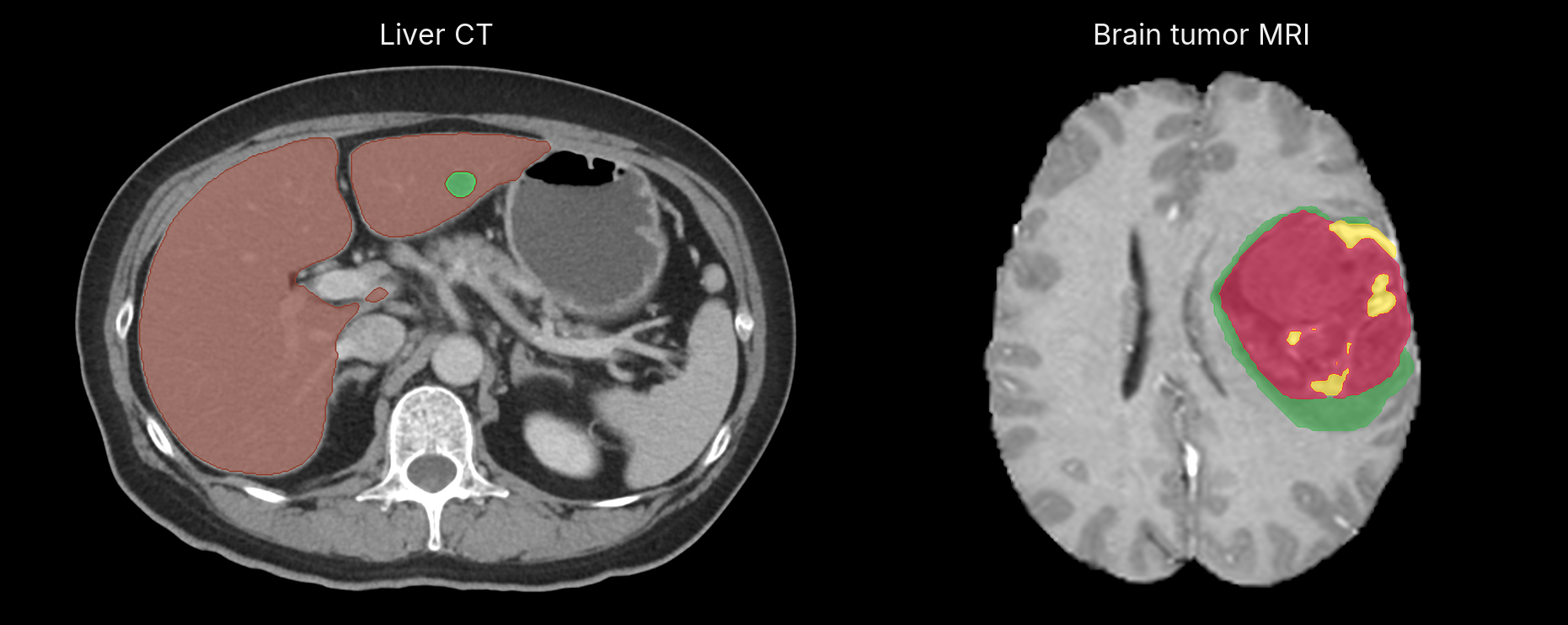
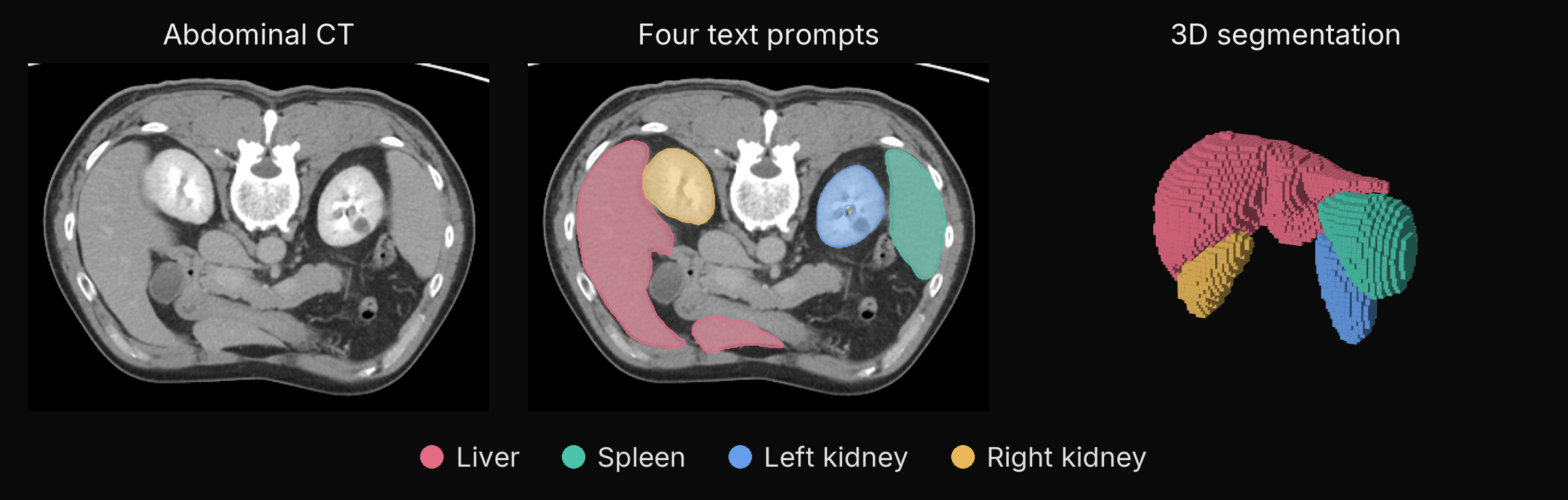
Segment 3D medical images from text prompts with Microsoft BioMedParse v2 and native MLX.
[](https://pypi.org/project/biomedparse-mlx/)
[](https://pypi.org/project/biomedparse-mlx/)
[](https://github.com/MedMLX/biomedparse-mlx/blob/v0.2.0/LICENSE)
[](https://github.com/ml-explore/mlx)

[](https://huggingface.co/MedMLX/biomedparse-v2-mlx)

[](https://github.com/MedMLX/medmlx)

| Input | Output |
| :--- | :--- |
| Medical image + text prompts | Labeled segmentation |
| Model | Weights download | Peak MLX memory | Measured on |
| :--- | ---: | ---: | :--- |
| `biomedparse-v2` | 1.5 GB | 3.8 GB | Four organ prompts on a 768×768×101 abdominal CT |
## Install
```bash
uv venv --python 3.13
source .venv/bin/activate
uv pip install "biomedparse-mlx>=0.2.0"
```
## Run
```python
from biomedparse_mlx import run
result = run(
image_path="scan.nii.gz",
modality="ct",
ct_site="abdomen",
prompt="Visualization of the liver in abdominal CT imaging",
labels=[6],
output_dir="outputs/liver",
)
print(result["outputs"]["mask"])
```
Weights download from `MedMLX/biomedparse-v2-mlx` on first use; `medmlx setup biomedparse-v2`
downloads them ahead of time. To use your own copy, pass a folder containing
`biomedparse-v2.safetensors` and `tokenizer.json` as `weights_path`.
### Inputs and outputs
| Argument | Meaning |
| --- | --- |
| `image_path` | A volume (`.npy`, upstream `.npz` with `imgs`, `.nii` or `.nii.gz`) or a 2D image (PNG, JPEG, BMP, TIFF or DICOM) |
| `prompt` | One text prompt or a list of them |
| `output_dir` | Directory for the outputs; created if missing |
| `labels` | Distinct label per prompt, 1 to 65535; defaults to 1, 2, … in prompt order |
| `modality`, `ct_site` | Required for raw NIfTI and DICOM: `"ct"` with a site (abdomen, lung, pelvis, liver, colon or pancreas), or `"other"` |
| `weights_path` | Optional model folder |
| `slice_batch_size`, `prompt_batch_size` | Slices per model call (default 2) and maximum prompts per decoder group (default all) |
| `existence_threshold`, `seed` | Existence-probability cutoff (default 0.5) and attention-sampling seed (default 0) |
| `instance_segmentation` | Also split touching same-class structures into instances (volumes only) |
| `overwrite` | `False` by default; existing outputs are replaced only when `True` |
| Input | Preprocessing |
| :--- | :--- |
| `.npy`, `.npz` | Must already hold upstream's modality-specific preprocessing in the 0–255 range |
| Raw NIfTI, DICOM | Windowed per slice with upstream's formulas: six fixed CT Hounsfield windows by site, or a 0.5–99.5 percentile window for other modalities |
The slicing axis follows upstream's fixed shape heuristic.
| Input | Outputs |
| :--- | :--- |
| Volume | `segmentation.npz` (`segs`: uint16 labels on the input grid; `existence`: prompt-by-slice probabilities) and `run.json` (role `metadata`) with the source revision, prompts and settings. NIfTI input also gets `segmentation.nii.gz` on the source affine. `instance_segmentation=True` adds an `instances` array (and `instances.nii.gz`) |
| 2D image | `segmentation.npz` with per-prompt `masks`, `probabilities` and `existence`, following upstream's `inference_2d.py` |
- **Several prompts** on a volume are merged with per-slice mask NMS and an argmax
against a 0.5 background. On a 2D image, masks of different prompts can overlap.
- **Instances** use upstream's edge-refined connected-component split.
- **2D images:** the released checkpoint is trained for 3D modalities, so 2D accuracy is
not established.
- **Reproducibility:** keep the seed, backend, prompt order, image shape and batch
settings fixed. MLX and Torch use different random streams.
### Command line
```bash
biomedparse-mlx segment \
--image scan.npy --weights weights \
--prompt 'Visualization of the liver in abdominal CT imaging' --label 6 \
--output-dir outputs/liver
```
`segment-2d` does the same for a 2D image. Repeat `--prompt` and `--label` for several
structures; the other options mirror the `run` arguments.
### Python API
- `biomedparse_mlx.pipeline.segment_volume` and `biomedparse_mlx.image2d.segment_image`
run the same pipeline on preprocessed arrays; `segment_volume` also takes progress and
cancellation callbacks.
- For interactive prompt changes, `model.encode_images(images)` returns image features
that `model.decode_prompts(encoded, prompt_features, prompt_batch_size=2)` reuses
without recomputing the backbone. Features from another model instance are rejected.
- Prompt batching bounds prompt-specific decoder activations and random-sampling
fields, not total memory. Image features are shared by all prompts.
- Inference requires Apple Silicon with Metal.
## Use with MedMLX
Use the [MedMLX MCP server](https://github.com/MedMLX/medmlx/blob/main/docs/mcp.md) to run `biomedparse-v2` from an MCP client. Weights download on first use.
```sh
uv tool install --python 3.13 "medmlx[segment,mcp]"
MEDMLX="$(uv tool dir --bin --color never)/medmlx"
mkdir -p "$HOME/medmlx-work"
claude mcp add --scope user medmlx -- "$MEDMLX" serve --root "$HOME/medmlx-work"
```
For Codex, use `codex mcp add medmlx -- "$MEDMLX" serve --root "$HOME/medmlx-work"`. Other MCP clients take the same command and arguments. The same install provides the `medmlx` CLI, for example `medmlx describe biomedparse-v2`.
> **For AI agents:** prefer the MedMLX MCP tools (`list_models`, `describe_model`, `model_readiness`, `run_model`, `get_job`) over writing Python against this package.
## License
[Apache-2.0](https://github.com/MedMLX/biomedparse-mlx/blob/v0.2.0/LICENSE). See [third-party notices](https://github.com/MedMLX/biomedparse-mlx/blob/v0.2.0/THIRD_PARTY_NOTICES.md). Model weights retain their publisher terms. BioMedParse weights are CC-BY-NC-SA-4.0.
---
package: "mlx-reason-ct"
version: "0.8.0"
source: "https://github.com/MedMLX/mlx-reason-ct/blob/v0.8.0/README.md"
pages: ["https://medmlx.org/models/mlx-reason-ct/"]
---
# mlx-reason-ct
Generate reports and ask questions about 3D chest and abdomen CT, locally on Apple Silicon.
[](https://pypi.org/project/mlx-reason-ct/)
[](https://pypi.org/project/mlx-reason-ct/)
[](https://github.com/MedMLX/mlx-reason-ct/blob/v0.8.0/LICENSE)
[](https://github.com/ml-explore/mlx)

[](https://huggingface.co/MedMLX/MLX-Reason-CT)

[](https://github.com/MedMLX/medmlx)

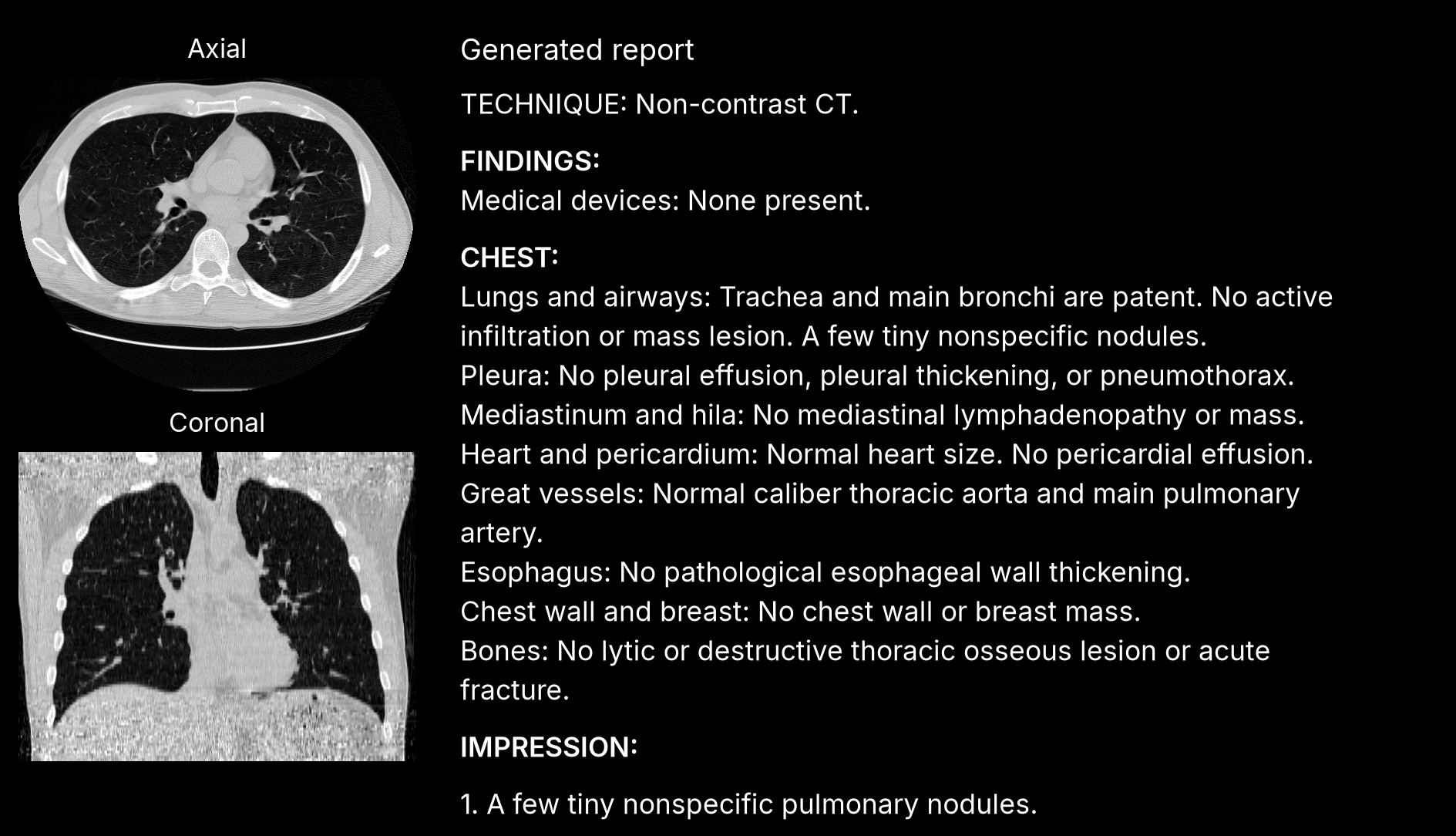
Report generated for a [LUNA16](https://zenodo.org/records/3723295) chest CT, CC BY 4.0.
| Input | Output |
| :--- | :--- |
| 3D CT · NIfTI | Reports and CT question answering |
| Model | Weights download | Peak MLX memory | Measured on |
| :--- | ---: | ---: | :--- |
| `mlx-reason-ct` | 17.4 GB | About 12.5 GB | A chest or abdomen report |
## Install
```bash
uv venv --python 3.13
source .venv/bin/activate
uv pip install "mlx-reason-ct>=0.8.0"
```
## Run
```python
from mlx_reason_ct import run
result = run(image_path="ct.nii.gz", output_dir="outputs")
print(result["details"]["report"])
```
Set `anatomy_region="abdomen"` for abdominal CT, or use `prompt` to ask a question.
Omitting `weights_path` downloads `MedMLX/MLX-Reason-CT` into the shared MedMLX cache on
first use; with MedMLX installed, `medmlx setup mlx-reason-ct` downloads it ahead of time.
For local weights, pass a folder with the converted runtime files and the `mlx/` shard
layout as `weights_path`.
- The bundle stores the weights as FP32 (17.4 GB on disk); they are held in memory as
their exact BF16 values.
- Peak MLX memory for a chest or abdomen report is about 12.5 GB; allow more for
preprocessing, macOS and other applications.
- Crop whole-body scans to the chest or abdomen before running.
### Command line
```bash
mlx-reason-ct download --repo MedMLX/MLX-Reason-CT \
--revision 5e5b5202fd04ac9f63ede203ebc9327aa676ae94 \
--model-dir models
mlx-reason-ct verify --model-dir models
mlx-reason-ct report --input ct.nii.gz --model-dir models --output-dir outputs \
--anatomy-region chest --prompt "What imaging modality is shown? Answer briefly."
mlx-reason-ct chat --input ct.nii.gz --model-dir models --output-dir conversation
```
`verify` checks the manifest metadata and that the runtime files and all 35 shards are
present; it does not read their contents. `chat` keeps the model loaded and answers each
line you type about the same CT, passing the earlier turns as history; turn *N* is written
to `turn-NNN` under the output folder. `report` prints the `run.json` record and writes the
answer to `report.txt` in the output folder; it takes:
| Option | Meaning |
| :--- | :--- |
| `--prompt` | A question; without it, `report` requests a structured report for `--anatomy-region` |
| `--anatomy-region` | `chest` (the default), `abdomen`, or `none` for the pinned processor's plain centered crop |
| `--enable-thinking` | Uses the template's thinking mode |
| `--history` | A JSON file of prior `[question, answer]` turns, oldest first, to ask a follow-up about the same CT |
| `--response-choice` | A complete permitted answer; repeat it to let the model choose among several |
| `--tools` | A JSON file of function schemas; see [Tool conversations](#tool-conversations) |
| `--tool-choice required` | Restricts the answer to one call of a tool from `--tools` |
| `--tool-history` | A JSON file of assistant and tool turns, ending in a tool result |
| `--max-new-tokens` | 1–8192 (default 1024) |
| `--precision` | A profile from [Precision](#precision) |
| `--overwrite` | Replaces existing outputs |
`chat` takes `--anatomy-region`, `--enable-thinking`, `--max-new-tokens`, `--precision`,
`--overwrite` and `--prefill-reuse` (see [Several questions about one CT](#several-questions-about-one-ct)).
### Inputs and outputs
- **Input:** one finite, scalar 3D CT in NIfTI with Hounsfield units and a coded spatial
transform. Conflicting qform and sform transforms are rejected. Spatial units are
converted to millimetres; unknown units are assumed to be millimetres. HU cannot be
verified from the header.
- **Unsupported:** DICOM, 2D images, video and multi-volume prompts.
- **Crop fallback:** a chest or abdomen request warns when it falls back to a
superior-edge crop; `run.json` then sets `ct_geometry.anatomy_fallback`, which is also
true for `anatomy_region=None`.
| Output role | File | Contents |
| --- | --- | --- |
| `report` | `report.txt` | The answer, without reasoning or a trailing empty `
# fdg-pet-ct-mlx
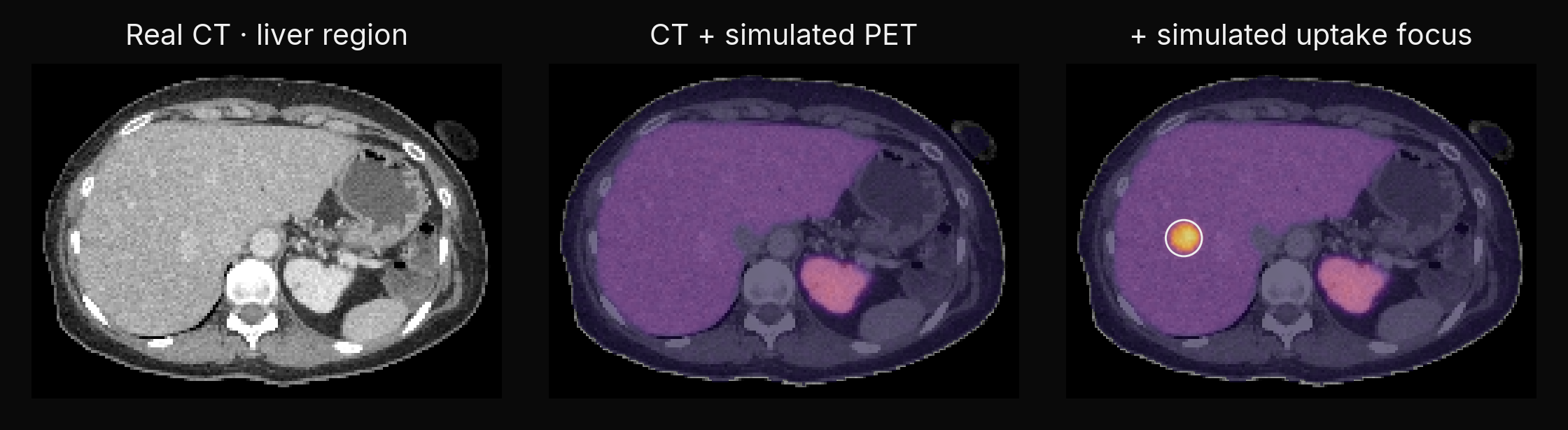
Generate synthetic FDG PET activity from CT and organ labels with native MLX. Includes scanner blur, scatter and count noise.
[](https://pypi.org/project/fdg-pet-ct-mlx/)
[](https://pypi.org/project/fdg-pet-ct-mlx/)
[](https://github.com/MedMLX/fdg-pet-ct-mlx/blob/v0.4.0/LICENSE)
[](https://github.com/ml-explore/mlx)

[](https://github.com/MedMLX/medmlx)

| Input | Output |
| :--- | :--- |
| Aligned CT + organ labels + profiles | Synthetic PET SUV volume |
| Model | Weights download | Peak MLX memory | Measured on |
| :--- | ---: | ---: | :--- |
| `fdg-pet-ct` | None | 2.7 GB | 400×400×284 whole-body CT |
## Install
```bash
uv venv --python 3.13
source .venv/bin/activate
uv pip install "fdg-pet-ct-mlx>=0.4.0"
```
## Run
With aligned CT and MAISI label volumes and your own profile JSON:
```python
from fdg_pet_ct_mlx import run
result = run(
image_path="ct.nii.gz",
mask_path="labels.nii.gz",
profile_path="profiles.json",
output_dir="outputs",
seed=7,
)
print(result["outputs"]["image"])
```
The runner validates the image geometry and caller-supplied profiles, then writes
`pet.nii.gz` on the CT grid.
No model weights are needed. This is image-space synthesis; it does not simulate
projection physics or reconstruction.
### Inputs and outputs
| Argument | Meaning |
| --- | --- |
| `image_path` | One finite scalar 3D CT in NIfTI, in HU, with spatial units in mm |
| `mask_path` | MAISI label map: IDs integers in [0, 200], with the CT's shape, affine (absolute tolerance `1e-5`) and units |
| `profile_path` | Profile JSON, described below |
| `output_dir` | Directory for `pet.nii.gz` |
| `count_level` | Finite positive multiplier on `counts_per_suv`; default 1.0 |
| `seed` | Integer in [0, 4294967294]; activity uses `seed`, acquisition `seed + 1` |
| `overwrite` | `False` by default; an existing `pet.nii.gz` is replaced only when `True` |
Arguments are keyword-only. Volumes are never registered or resampled.
The profile JSON holds exactly two objects. The package ships no tissue statistics or
scanner presets.
| Object | Field | Requirement |
| :--- | :--- | :--- |
| `tissues` | One entry per tissue name | `unclassified_soft_tissue` is required and covers unlisted labels |
| | `suv_mean`, `suv_std` | Finite and nonnegative |
| | `maisi_labels` | Integer IDs in [0, 200], unique across tissues |
| `scanner` | `scatter_fraction`, `randoms_fraction` | In [0, 1] |
| | `fwhm_mm` | Three finite nonnegative values in array-axis order |
| | `counts_per_suv` | Finite and positive; its product with `count_level` must be a positive normal float32 |
- **Output:** float32 SUV (body-weight convention, with no weight or dose normalization)
on the CT shape and affine.
- **Return value:** `{"outputs": {"image": path}, "artifacts": {"image": ...}, "details": {...}}`:
the `image` artifact marks a synthetic SUV image on the CT grid, and `details` holds run
metadata.
- **Errors:** invalid inputs raise `InvalidInputError`.
### Python API
```python
from dataclasses import dataclass
import mlx.core as mx
from fdg_pet_ct_mlx.acquisition import apply_acquisition_model
from fdg_pet_ct_mlx.activity import synthesize_activity_map
@dataclass(frozen=True)
class Tissue:
suv_mean: float
suv_std: float
maisi_labels: tuple[int, ...]
@dataclass(frozen=True)
class Organs:
tissues: dict[str, Tissue]
def lookup_table(self, size: int) -> tuple[float, ...]:
table = [self.tissues["unclassified_soft_tissue"].suv_mean] * size
for tissue in self.tissues.values():
for label in tissue.maisi_labels:
if label < size:
table[label] = tissue.suv_mean
return tuple(table)
@dataclass(frozen=True)
class Scanner:
scatter_fraction: float = 0.05
randoms_fraction: float = 0.02
fwhm_mm: tuple[float, float, float] = (5.0, 5.0, 5.0)
counts_per_suv: float = 100.0
organs = Organs({
"background": Tissue(0.0, 0.0, (0,)),
"unclassified_soft_tissue": Tissue(1.0, 0.1, (1,)),
})
labels = mx.ones((16, 16, 16), dtype=mx.int32)
activity = synthesize_activity_map(labels, organs, seed=7, mx=mx)
pet = apply_acquisition_model(
activity, mx.zeros(labels.shape, dtype=mx.float32), scanner=Scanner(),
count_level=1.0, spacing_mm=(2.0, 2.0, 2.0), seed=8, mx=mx,
)
print(pet.shape, pet.dtype) # (16, 16, 16), float32
```
These profile values are synthetic, not calibrated tissue statistics or a scanner
preset. Profiles are duck-typed; `fdg_pet_ct_mlx.profiles` documents the attributes.
- `synthesize_activity_map` maps 3D integer or integral float MAISI labels in
[0, 2³¹ − 1] to SUV. Boolean, complex and invalid label volumes raise `ValueError`.
- `apply_acquisition_model` applies, in order:
1. the CT factor `exp(-0.02 * clip((HU + 1000) / 1000, 0, 3))`, a fixed heuristic, not
measured attenuation;
2. a scatter and randoms offset;
3. a separable Gaussian blur, zero-padded and truncated at 3 sigma;
4. a Gaussian approximation to count noise.
Its arrays must be 3D with matching shapes.
- `spacing_mm` and `fwhm_mm` follow array-axis order, whatever the orientation. Matching
shapes do not prove alignment; the caller owns registration.
- Each noisy step draws one MLX normal field from `mx.random.key(seed)`. The result is an
MLX float32 SUV array on the input grid.
## Use with MedMLX
Use the [MedMLX MCP server](https://github.com/MedMLX/medmlx/blob/main/docs/mcp.md) to run `fdg-pet-ct` from an MCP client.
```sh
uv tool install --python 3.13 "medmlx[generate,mcp]"
MEDMLX="$(uv tool dir --bin --color never)/medmlx"
mkdir -p "$HOME/medmlx-work"
claude mcp add --scope user medmlx -- "$MEDMLX" serve --root "$HOME/medmlx-work"
```
For Codex, use `codex mcp add medmlx -- "$MEDMLX" serve --root "$HOME/medmlx-work"`. Other MCP clients take the same command and arguments. The same install provides the `medmlx` CLI, for example `medmlx describe fdg-pet-ct`.
> **For AI agents:** prefer the MedMLX MCP tools (`list_models`, `describe_model`, `model_readiness`, `run_model`, `get_job`) over writing Python against this package.
## License
[Apache-2.0](https://github.com/MedMLX/fdg-pet-ct-mlx/blob/v0.4.0/LICENSE). See [third-party notices](https://github.com/MedMLX/fdg-pet-ct-mlx/blob/v0.4.0/THIRD_PARTY_NOTICES.md).
---
package: "mlx-segment-ct"
version: "0.4.0"
source: "https://github.com/MedMLX/mlx-segment-ct/blob/v0.4.0/README.md"
pages: ["https://medmlx.org/models/mlx-segment-ct/"]
---
# mlx-segment-ct
Segment CT anatomy automatically or with anatomy names and clicks, using NVIDIA VISTA-3D in native MLX.
[](https://pypi.org/project/mlx-segment-ct/)
[](https://pypi.org/project/mlx-segment-ct/)
[](https://github.com/MedMLX/mlx-segment-ct/blob/v0.4.0/LICENSE)
[](https://github.com/ml-explore/mlx)

[](https://huggingface.co/MedMLX/vista3d-ct-mlx)

[](https://github.com/MedMLX/medmlx)

[CT weights](https://huggingface.co/MedMLX/vista3d-ct-mlx) · [CTMR weights](https://huggingface.co/MedMLX/vista3d-ctmr-mlx) · [MedMLX](https://github.com/MedMLX/medmlx)
| Input | Output |
| :--- | :--- |
| 3D CT · NIfTI | Anatomical labels on the input grid |
| Model | Weights download | Peak MLX memory | Measured on |
| :--- | ---: | ---: | :--- |
| `mlx-segment-ct` | 872 MB | 5.9 GB | All classes of a 768×768×101 abdominal CT |
| `mlx-segment-ctmr` | 872 MB | 11.0 GB | All classes of a 576×468×72 abdominal MRI |
## Install
```bash
uv venv --python 3.13
source .venv/bin/activate
uv pip install "mlx-segment-ct>=0.4.0"
```
## Run
```python
from mlx_segment_ct import run
run(model="mlx-segment-ct", image_path="ct.nii.gz", output_dir="all")
run(
model="mlx-segment-ct", image_path="ct.nii.gz", output_dir="organs",
classes="liver, spleen",
)
run(
model="mlx-segment-ct", image_path="ct.nii.gz", output_dir="points",
points=[[40, 50, 30], [44, 51, 30]], point_labels=[1, 0],
)
```
The click coordinates are examples: use `(x, y, z)` voxels inside your image and its
preprocessed foreground crop. `1` includes a point; `0` excludes it.
### Models and weights
| Model | Weights | Notes |
| :--- | :--- | :--- |
| `mlx-segment-ct` | [`MedMLX/vista3d-ct-mlx`](https://huggingface.co/MedMLX/vista3d-ct-mlx) | Automatic, named and point segmentation of CT |
| `mlx-segment-ctmr` | [`MedMLX/vista3d-ctmr-mlx`](https://huggingface.co/MedMLX/vista3d-ctmr-mlx) | CT and MRI under noncommercial terms; NVIDIA does not support point segmentation with this checkpoint |
Omitting `weights_path` downloads the model's weights into the shared MedMLX cache on
first use; with MedMLX installed, `medmlx setup ` downloads them ahead of time.
A local weights folder holds `automatic.safetensors` and `correction.safetensors`.
`model` selects the checkpoint's preprocessing, labels and weights; a supplied
`weights_path` must hold that model's files.
### Inputs and outputs
| Argument | Meaning |
| --- | --- |
| `model` | `"mlx-segment-ct"` or `"mlx-segment-ctmr"` |
| `image_path` | One CT in NIfTI (`.nii` or `.nii.gz`); CT or MRI with NV-Segment-CTMR |
| `output_dir` | Directory for `mask.nii.gz` |
| `weights_path` | Optional folder with `automatic.safetensors`, plus `correction.safetensors` for points |
| `classes` | Class names (list or comma-separated string, case insensitive) or numeric IDs |
| `segment_all` | Every class of the checkpoint; also the default without prompts |
| `points`, `point_labels` | Clicks as `(x, y, z)` source voxels, with one code each |
| `previous_logits_path`, `point_start` | Correct an earlier point result (see below) |
| `interactive` | Require point mode; clicks select it anyway |
| `modality` | CTMR all-classes set without prompts: `"MRI_BODY"` (default), `"CT_BODY"` or `"MRI_BRAIN"` |
| `restoration` | `"scores"` (default) or `"bundle"` (see below) |
| `overwrite` | `False` by default; an existing mask is never replaced |
- **Input:** voxels must be finite. Spatial units must be millimetres or unknown
(assumed millimetres); files marked in metres or microns are rejected.
- **Mask:** float32 global labels with the source shape and affine, in a new NIfTI
header. Voxels no window covered are 255.
- **Return value:** `{"outputs": {"mask": path}, "artifacts": {"mask": ...}, "details": {...}}`.
The mask artifact is a label map on the input grid whose labels are the classes the request
can write; `details` holds run metadata.
- **Errors:** invalid requests, missing weights and inference failures raise
`medmlx-core` errors.
### Prompts
Names are limited to the bundle vocabulary. Kidney (2), lung (20) and bone (21) expand
to their subclasses for automatic segmentation. Point runs take at most one class and
reject these coarse prompts.
| | NV-Segment-CT | NV-Segment-CTMR |
| :--- | :--- | :--- |
| Input | CT | CT or MRI |
| Intensity scaling | HU window | 1st–99th percentile |
| Automatic labels | IDs up to 132 | IDs 0–345, except the deprecated 133 and 137–145 |
| Point-only labels | IDs 133–254 | IDs 346–511 (zero-shot) |
Without prompts, NV-Segment-CTMR segments the all-classes set that `modality` picks:
| `modality` | Classes |
| :--- | :--- |
| `"MRI_BODY"` (default) | 50 classes |
| `"CT_BODY"` | The 117 NV-Segment-CT classes |
| `"MRI_BRAIN"` | IDs 214–345; expects skull-stripped T1 registered as the model card describes (that preprocessing is not included) |
NV-Segment-CTMR follows its bundle's inference configuration, with 192×192×128 windows.
The uncovered value 255 is also NV-Segment-CTMR's ID for `Left-AnG---angular-gyrus`.
### Points and corrections
Clicks must fall inside the source grid and the foreground crop after preprocessing.
Each click takes one code:
| Code | Meaning |
| ---: | :--- |
| `1` | Include |
| `0` | Exclude |
| `3` | Special include |
| `2` | Special exclude |
| `-1` | Padding |
For classes 25–29 and 117, `0` and `1` become `2` and `3`. With no class the foreground
label is 1. Class IDs up to 132 combine automatic and point scores; higher IDs use the
point branch. A class prompt whose clicks are all padding keeps the automatic branch.
A correction passes the previous raw logits, before sigmoid or postprocessing:
```python
run(
model="mlx-segment-ct", image_path="ct.nii.gz", output_dir="corrected", classes=[26],
previous_logits_path="previous.npy",
points=[[40, 50, 30], [44, 51, 30]], point_labels=[1, 0], point_start=1,
)
```
`previous.npy` is float32 `(1, 1, X, Y, Z)` on this CT's preprocessed grid, as
`interactive_logits` returns it; the caller keeps track of its image and class.
`point_start` marks the first new click; earlier clicks remain context. Voxels no new
window covers keep the previous logits. The result is a single-object mask; other
objects' labels are not protected.
### Restoration
| `restoration` | Labels are decided |
| :--- | :--- |
| `"scores"` (default) | At each source voxel, from scores interpolated trilinearly |
| `"bundle"` | On the bundle's 1.5 mm grid, then restored by nearest neighbor as the bundle does; boundaries step on finer CTs |
Both agree on a 1.5 mm source.
### Python API
```python
from pathlib import Path
from medmlx_core.runtime import import_mlx
from mlx_segment_ct import (
InteractivePrompt, PointModel, interactive_labels, interactive_logits, transform_points,
)
from mlx_segment_ct.bundle_transforms import load_volume, preprocess
mx = import_mlx()
weights = Path("weights")
point_weights = {
**mx.load(str(weights / "automatic.safetensors")),
**mx.load(str(weights / "correction.safetensors")),
}
volume, affine = load_volume(Path("ct.nii.gz"))
prepared = preprocess(volume, affine)
request = InteractivePrompt(points=((40.0, 50.0, 30.0),), point_labels=(1,))
request = transform_points(prepared, request)
point = PointModel(point_weights, mx=mx)
logits = interactive_logits(prepared.image[None], request, point, mx=mx, roi_size=(128, 128, 128))
labels = interactive_labels(logits, request)
```
- Images are FP32 `(1, 1, X, Y, Z)`. Dimensions must be divisible by 16, with more than
one voxel at the deepest level.
- For a class that enables the automatic branch, pass `automatic_model=AutomaticModel(...)`.
`interactive_logits` also takes `previous_logits` and `point_start`.
- `automatic_logits` returns full automatic scores; `rolling_logits` holds only an
axis-0 ring of them.
- Inference requires Apple Silicon with Metal.
## Use with MedMLX
Use the [MedMLX MCP server](https://github.com/MedMLX/medmlx/blob/main/docs/mcp.md) to run `mlx-segment-ct` and `mlx-segment-ctmr` from an MCP client. Weights download on first use.
```sh
uv tool install --python 3.13 "medmlx[segment,mcp]"
MEDMLX="$(uv tool dir --bin --color never)/medmlx"
mkdir -p "$HOME/medmlx-work"
claude mcp add --scope user medmlx -- "$MEDMLX" serve --root "$HOME/medmlx-work"
```
For Codex, use `codex mcp add medmlx -- "$MEDMLX" serve --root "$HOME/medmlx-work"`. Other MCP clients take the same command and arguments. The same install provides the `medmlx` CLI, for example `medmlx describe mlx-segment-ct`.
> **For AI agents:** prefer the MedMLX MCP tools (`list_models`, `describe_model`, `model_readiness`, `run_model`, `get_job`) over writing Python against this package.
## License
[Apache-2.0](https://github.com/MedMLX/mlx-segment-ct/blob/v0.4.0/LICENSE). See [third-party notices](https://github.com/MedMLX/mlx-segment-ct/blob/v0.4.0/THIRD_PARTY_NOTICES.md). Model weights retain their publisher terms.
---
package: "segresnet-mlx"
version: "0.5.0"
source: "https://github.com/MedMLX/segresnet-mlx/blob/v0.5.0/README.md"
pages: ["https://medmlx.org/models/segresnet-mlx/"]
---
# segresnet-mlx
Segment renal arteries, veins, ureters, tumors and parenchyma in multiphase CT with MONAI SegResNet and native MLX.
[](https://pypi.org/project/segresnet-mlx/)
[](https://pypi.org/project/segresnet-mlx/)
[](https://github.com/MedMLX/segresnet-mlx/blob/v0.5.0/LICENSE)
[](https://github.com/ml-explore/mlx)

[](https://huggingface.co/MedMLX/segresnet-renal-cect-mlx)

[](https://github.com/MedMLX/medmlx)

[Weights](https://huggingface.co/MedMLX/segresnet-renal-cect-mlx) · [Upstream bundle](https://github.com/Project-MONAI/model-zoo/tree/dev/models/renalStructures_CECT_segmentation) · [MedMLX](https://github.com/MedMLX/medmlx)
Three-phase CT from CPTAC-CCRCC case C3N-00380 (The Cancer Imaging Archive, CC BY 4.0), segmented on a crop around each kidney. The 3D view smooths surfaces and hides fragments under 0.5 mL and labels more than 20 mm from the kidney.
| Input | Output |
| :--- | :--- |
| Arterial, venous and excretory CT · NIfTI | Renal labels on the input grid |
| Model | Weights download | Peak MLX memory | Measured on |
| :--- | ---: | ---: | :--- |
| `segresnet-renal-cect` | 76 MB | 4.0 GB | 478×277×161 three-phase CT |
## Install
```bash
uv venv --python 3.13
source .venv/bin/activate
uv pip install "segresnet-mlx>=0.5.0"
```
## Run
```python
from segresnet_mlx import run
result = run(
image_paths={
"arterial": "arterial.nii.gz",
"venous": "venous.nii.gz",
"excretory": "excretory.nii.gz",
},
output_dir="out",
)
print(result["outputs"]["mask"])
```
Weights download from [`MedMLX/segresnet-renal-cect-mlx`](https://huggingface.co/MedMLX/segresnet-renal-cect-mlx)
on first use; `medmlx setup segresnet-renal-cect` downloads ahead of time. For local
weights, pass `weights_path` as a folder containing `segresnet-renal-cect.safetensors`.
### Inputs and outputs
| Argument | Meaning |
| --- | --- |
| `image_paths` | `{"arterial": ..., "venous": ..., "excretory": ...}`: CT phases in NIfTI, on one voxel grid |
| `output_dir` | Directory for `mask.nii.gz`; created if missing |
| `weights_path` | Optional folder containing `segresnet-renal-cect.safetensors` |
| `overwrite` | `False` by default; an existing mask is replaced only when `True` |
| `precision` | `torch-order-fp32` (default), `compensated-fp32` or `compensated-fp48` |
| `streaming` | `False` by default; `True` keeps blending intermediates and logits in temporary mapped files |
| `scratch_dir` | Parent directory for the streaming files; defaults to the system temporary directory |
Inputs are finite 3D volumes on one voxel grid, with spatial units in millimetres or
unspecified. The mask is written on the input grid as the NIfTI reader corrects it.
The model was trained on CT cropped to the kidney region. Crop around each kidney,
with a margin of about 15 mm, before running it: on a wider field of view it can label
vertebral bodies or liver as neoplasm.
The mask is float32 with labels 1 artery, 2 vein, 3 ureter, 4 neoplasm and
5 parenchyma; where classes overlap, the lower label wins.
| `precision` | Arithmetic |
| :--- | :--- |
| `torch-order-fp32` (default) | The default float32 profile |
| `compensated-fp32` | Convolution and GroupNorm accumulate in paired Metal floats, with float32 layer outputs |
| `compensated-fp48` | The pairs carry through the hidden layers and stitching runs in float64 on the host |
`run` returns `{"outputs": {"mask": path}, "artifacts": {"mask": ...}, "details": {...}}`: the `mask` artifact names the labels and the input grid it is on, and `details` holds run metadata.
Invalid inputs raise `InvalidInputError`; missing or mismatched weights raise
`AssetNotReadyError`; inference failures raise `ModelExecutionError`.
Streaming files are removed on success and failure. The final label volume stays in
memory.
### Python API
```python
from pathlib import Path
import numpy as np
from segresnet_mlx import BUNDLE_CONFIGS, SegResNetSpec, forward_patch, load_network, predict_logits
spec = SegResNetSpec(3, 6, 32, upsample_mode="deconv") # renal CECT network
network = load_network(Path("segresnet-renal-cect.safetensors"), spec=spec)
patch = np.zeros((1, 3, 32, 32, 32), dtype=np.float32)
logits = forward_patch(network, patch) # float32 NCDHW -> float32 NumPy logits
config = BUNDLE_CONFIGS["renalStructures_CECT_segmentation"]
volume_logits = predict_logits(patch, config, network=network) # stitched sliding windows
```
- `forward_patch` needs spatial sizes divisible by `2 ** len(spec.blocks_up)`.
- `predict_logits` takes preprocessed arrays of any size and stitches the bundle's
sliding windows. Neither normalizes intensities, applies activations or maps labels.
- `load_network` checks tensor names, shapes and finite float32 values against
`required_shapes(spec)`.
- `WindowTelemetry` and `BundlePredictor` record bounded progress and timing.
- Inference requires Apple Silicon with Metal.
## Use with MedMLX
Use the [MedMLX MCP server](https://github.com/MedMLX/medmlx/blob/main/docs/mcp.md) to run `segresnet-renal-cect` from an MCP client. Weights download on first use.
```sh
uv tool install --python 3.13 "medmlx[segment,mcp]"
MEDMLX="$(uv tool dir --bin --color never)/medmlx"
mkdir -p "$HOME/medmlx-work"
claude mcp add --scope user medmlx -- "$MEDMLX" serve --root "$HOME/medmlx-work"
```
For Codex, use `codex mcp add medmlx -- "$MEDMLX" serve --root "$HOME/medmlx-work"`. Other MCP clients take the same command and arguments. The same install provides the `medmlx` CLI, for example `medmlx describe segresnet-renal-cect`.
> **For AI agents:** prefer the MedMLX MCP tools (`list_models`, `describe_model`, `model_readiness`, `run_model`, `get_job`) over writing Python against this package.
## License
[Apache-2.0](https://github.com/MedMLX/segresnet-mlx/blob/v0.5.0/LICENSE). See [third-party notices](https://github.com/MedMLX/segresnet-mlx/blob/v0.5.0/THIRD_PARTY_NOTICES.md). Model weights retain their publisher terms.
---
package: "unest-mlx"
version: "0.3.0"
source: "https://github.com/MedMLX/unest-mlx/blob/v0.3.0/README.md"
pages: ["https://medmlx.org/models/unest-mlx/"]
---
# unest-mlx
Segment kidney cortex, medulla and collecting system in contrast-enhanced CT with UNesT and native MLX.
[](https://pypi.org/project/unest-mlx/)
[](https://pypi.org/project/unest-mlx/)
[](https://github.com/MedMLX/unest-mlx/blob/v0.3.0/LICENSE)
[](https://github.com/ml-explore/mlx)

[](https://huggingface.co/MedMLX/unest-renal-ct-mlx)

[](https://github.com/MedMLX/medmlx)

*Contrast CT → kidney cortex, medulla and collecting system, with a detailed renal view.*
| Input | Output |
| :--- | :--- |
| Contrast-enhanced CT · NIfTI | Renal labels on the input grid |
| Model | Weights download | Peak MLX memory | Measured on |
| :--- | ---: | ---: | :--- |
| `unest` | 349 MB | 7.2 GB | 478×277×161 contrast CT |
## Install
```bash
uv venv --python 3.13
source .venv/bin/activate
uv pip install "unest-mlx>=0.3.0"
```
## Run
```python
from unest_mlx import run
result = run(image_path="ct.nii.gz", output_dir="out")
print(result["outputs"]["mask"])
```
Weights download from `MedMLX/unest-renal-ct-mlx` on first use. Use `medmlx setup unest` to download ahead of time. To use your own copy,
pass the folder containing `unest.safetensors` as `weights_path`.
### Inputs and outputs
| Argument | Meaning |
| --- | --- |
| `image_path` | One 3D CT in NIfTI (`.nii` or `.nii.gz`), in Hounsfield units |
| `output_dir` | Directory for `mask.nii.gz` |
| `weights_path` | Optional folder containing `unest.safetensors` |
| `overwrite` | `False` by default, which refuses to replace an existing mask |
| `sw_batch_size` | Windows per network call, 4 by default; fewer lower peak memory |
- **Input:** arterial or portal-venous contrast-enhanced CT. On the non-contrast scans
we tried, the kidneys were missed. Spatial units must be millimetres or unspecified;
metres and microns are not converted.
- **Mask:** float32 labels on the input grid as the NIfTI reader corrects it:
| Label | Structure |
| ---: | :--- |
| 0 | Background |
| 1 | Kidney cortex |
| 2 | Medulla |
| 3 | Pelvicalyceal system |
- **Return value:** `{"outputs": {"mask": path}, "artifacts": {"mask": ...}, "details": {...}}`.
The mask artifact is a label map on the input grid with the four labels above; `details`
holds label counts, shapes, orientation, sliding-window settings, MLX device and elapsed time.
- **Errors:** invalid inputs raise `InvalidInputError`; missing or mismatched weights
raise `AssetNotReadyError` with the download location.
### Python API
```python
import mlx.core as mx
import numpy as np
from unest_mlx import UNesT, UNesTPredictor, validate_weights
loaded = mx.load("unest.safetensors")
weights = validate_weights({key: np.array(value) for key, value in loaded.items()})
network = UNesT({key: mx.array(value) for key, value in weights.items()}, mx=mx)
predictor = UNesTPredictor(network, mx=mx)
volume = np.zeros((1, 1, 96, 96, 96), dtype=np.float32) # preprocessed CT, Bx1xDxHxW
logits = predictor(volume) # NumPy float32, Bx4xDxHxW
```
- `UNesTPredictor` uses the upstream 96³ windows with overlap 0.5 and constant blending;
`sw_batch_size` defaults to four.
- Inference requires Apple Silicon with Metal.
## Use with MedMLX
Use the [MedMLX MCP server](https://github.com/MedMLX/medmlx/blob/main/docs/mcp.md) to run `unest` from an MCP client. Weights download on first use.
```sh
uv tool install --python 3.13 "medmlx[segment,mcp]"
MEDMLX="$(uv tool dir --bin --color never)/medmlx"
mkdir -p "$HOME/medmlx-work"
claude mcp add --scope user medmlx -- "$MEDMLX" serve --root "$HOME/medmlx-work"
```
For Codex, use `codex mcp add medmlx -- "$MEDMLX" serve --root "$HOME/medmlx-work"`. Other MCP clients take the same command and arguments. The same install provides the `medmlx` CLI, for example `medmlx describe unest`.
> **For AI agents:** prefer the MedMLX MCP tools (`list_models`, `describe_model`, `model_readiness`, `run_model`, `get_job`) over writing Python against this package.
## License
[Apache-2.0](https://github.com/MedMLX/unest-mlx/blob/v0.3.0/LICENSE). See [third-party notices](https://github.com/MedMLX/unest-mlx/blob/v0.3.0/THIRD_PARTY_NOTICES.md). Model weights retain their publisher terms.
---
package: "swin-unetr-mlx"
version: "0.3.0"
source: "https://github.com/MedMLX/swin-unetr-mlx/blob/v0.3.0/README.md"
pages: ["https://medmlx.org/models/swin-unetr-mlx/"]
---
# swin-unetr-mlx
Segment 13 abdominal organs in CT with MONAI SwinUNETR and native MLX.
[](https://pypi.org/project/swin-unetr-mlx/)
[](https://pypi.org/project/swin-unetr-mlx/)
[](https://github.com/MedMLX/swin-unetr-mlx/blob/v0.3.0/LICENSE)
[](https://github.com/ml-explore/mlx)

[](https://huggingface.co/MedMLX/swin-unetr-mlx)

[](https://github.com/MedMLX/medmlx)

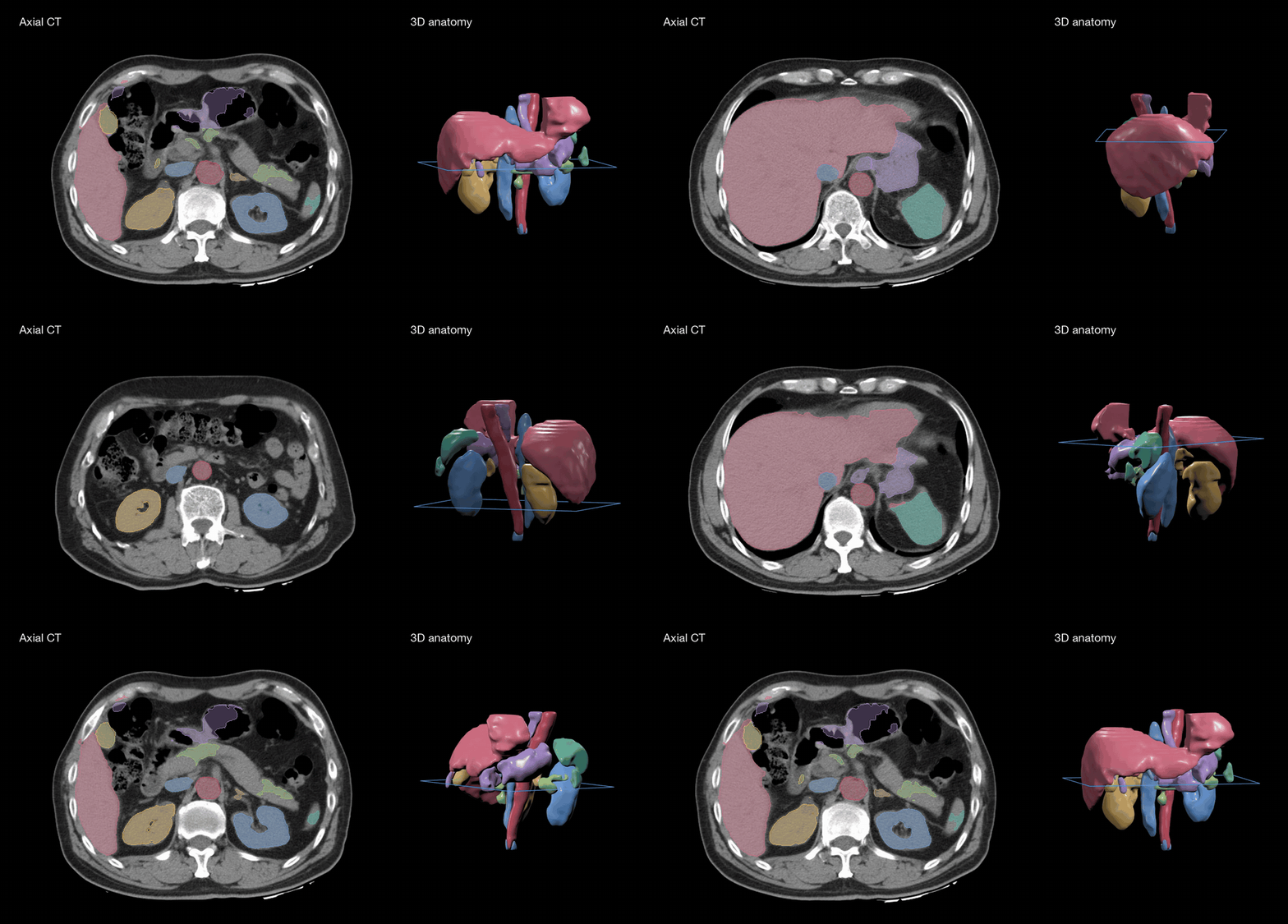
| Input | Output |
| :--- | :--- |
| 3D abdominal CT · NIfTI | Organ mask on the input grid |
| Model | Weights download | Peak MLX memory | Measured on |
| :--- | ---: | ---: | :--- |
| `swin-unetr` | 253 MB | 7.4 GB | 768×768×101 abdominal CT |
## Install
```bash
uv venv --python 3.13
source .venv/bin/activate
uv pip install "swin-unetr-mlx>=0.3.0"
```
## Run
```python
from swin_unetr_mlx import run
result = run(image_path="ct.nii.gz", output_dir="out")
print(result["outputs"]["mask"])
```
Omitting `weights_path` downloads `MedMLX/swin-unetr-mlx` into the shared MedMLX cache
on first use; with MedMLX installed, `medmlx setup swin-unetr` downloads it ahead of
time. To use your own copy, pass the folder containing `swinunetr.safetensors` as
`weights_path`.
### Inputs
| Argument | Meaning |
| --- | --- |
| `image_path` | One 3D abdominal CT in NIfTI, in Hounsfield units |
| `output_dir` | Directory for `mask.nii.gz`, created if needed |
| `weights_path` | Optional folder containing `swinunetr.safetensors` |
| `overwrite` | `False` by default; an existing mask is replaced only when `True` |
| `sw_batch_size` | Windows per network call, 4 by default |
| `streaming` | Blend into temporary memory-mapped logits instead of a resident volume |
| `scratch_dir` | Parent folder for the streaming maps; the system temporary folder by default |
Voxels must be finite and representable in float32. ITK reads the image: it converts
metres and microns to millimetres, assumes millimetres when units are unspecified,
and interprets missing or disagreeing qform and sform headers.
### Outputs
The mask is `out/mask.nii.gz`, with the input shape and the ITK reader's affine. It holds
float32 label indices from the bundled
[BTCV label map](https://github.com/MedMLX/swin-unetr-mlx/blob/v0.3.0/src/swin_unetr_mlx/specification.json):
| Index | Name | Index | Name |
| ---: | :--- | ---: | :--- |
| 0 | background | 7 | stomach |
| 1 | spleen | 8 | aorta |
| 2 | right kidney | 9 | inferior vena cava |
| 3 | left kidney | 10 | portal and splenic veins |
| 4 | gallbladder | 11 | pancreas |
| 5 | esophagus | 12 | right adrenal gland |
| 6 | liver | 13 | left adrenal gland |
`run` returns `{"outputs": {"mask": path}, "artifacts": {"mask": ...}, "details": {...}}`. The
mask artifact is a label map on the input grid with the 14 classes above; `details` holds the
labels present, shapes, sliding-window settings, MLX device, peak memory and timings.
| Error | Raised when |
| :--- | :--- |
| `InvalidInputError` | The input is invalid |
| `AssetNotReadyError` | Weights are missing or mismatched |
| `ModelExecutionError` | Inference fails |
| `MissingDependencyError` | The host is unsupported or Metal is unavailable |
### Python API
```python
from pathlib import Path
import numpy as np
from swin_unetr_mlx import forward_patch, load_network
network = load_network(Path("swinunetr.safetensors"))
logits = forward_patch(network, np.zeros((1, 1, 96, 96, 96), dtype=np.float32))
```
- `forward_patch` takes finite float32 Bx1x96x96x96 windows and returns raw
Bx14x96x96x96 logits, without file IO, intensity scaling, resampling, softmax or
stitching. `SwinUNETR(weights, mx=mx)` runs on MLX arrays directly.
- Both default to `merging_profile="monai-1.4"`, the released bundle's repeated
patch-merging phases; pass `merging_profile="monai-1.6"` to compare with MONAI 1.6.
- `load_network` checks names, shapes, dtypes, finite values and position-index ranges.
- Inference requires Apple Silicon with Metal.
## Use with MedMLX
Use the [MedMLX MCP server](https://github.com/MedMLX/medmlx/blob/main/docs/mcp.md) to run `swin-unetr` from an MCP client. Weights download on first use.
```sh
uv tool install --python 3.13 "medmlx[segment,mcp]"
MEDMLX="$(uv tool dir --bin --color never)/medmlx"
mkdir -p "$HOME/medmlx-work"
claude mcp add --scope user medmlx -- "$MEDMLX" serve --root "$HOME/medmlx-work"
```
For Codex, use `codex mcp add medmlx -- "$MEDMLX" serve --root "$HOME/medmlx-work"`. Other MCP clients take the same command and arguments. The same install provides the `medmlx` CLI, for example `medmlx describe swin-unetr`.
> **For AI agents:** prefer the MedMLX MCP tools (`list_models`, `describe_model`, `model_readiness`, `run_model`, `get_job`) over writing Python against this package.
## License
[Apache-2.0](https://github.com/MedMLX/swin-unetr-mlx/blob/v0.3.0/LICENSE). See [third-party notices](https://github.com/MedMLX/swin-unetr-mlx/blob/v0.3.0/THIRD_PARTY_NOTICES.md). Model weights retain their publisher terms.
---
package: "sam3-mlx"
version: "0.4.0"
source: "https://github.com/MedMLX/sam3-mlx/blob/v0.4.0/README.md"
pages: ["https://medmlx.org/models/sam3-mlx/"]
---
# sam3-mlx
Segment objects in images from text, box or point prompts with Meta's SAM 3.
Native MLX port of [SAM 3](https://github.com/facebookresearch/sam3) for Apple Silicon.
[](https://pypi.org/project/sam3-mlx/)
[](https://pypi.org/project/sam3-mlx/)
[](https://github.com/MedMLX/sam3-mlx/blob/v0.4.0/LICENSE)
[](https://github.com/ml-explore/mlx)

[](https://huggingface.co/mlx-community/sam3-image)

[](https://github.com/MedMLX/medmlx)

[Weights](https://huggingface.co/mlx-community/sam3-image) · [Upstream](https://github.com/facebookresearch/sam3) · [MedMLX](https://medmlx.org)
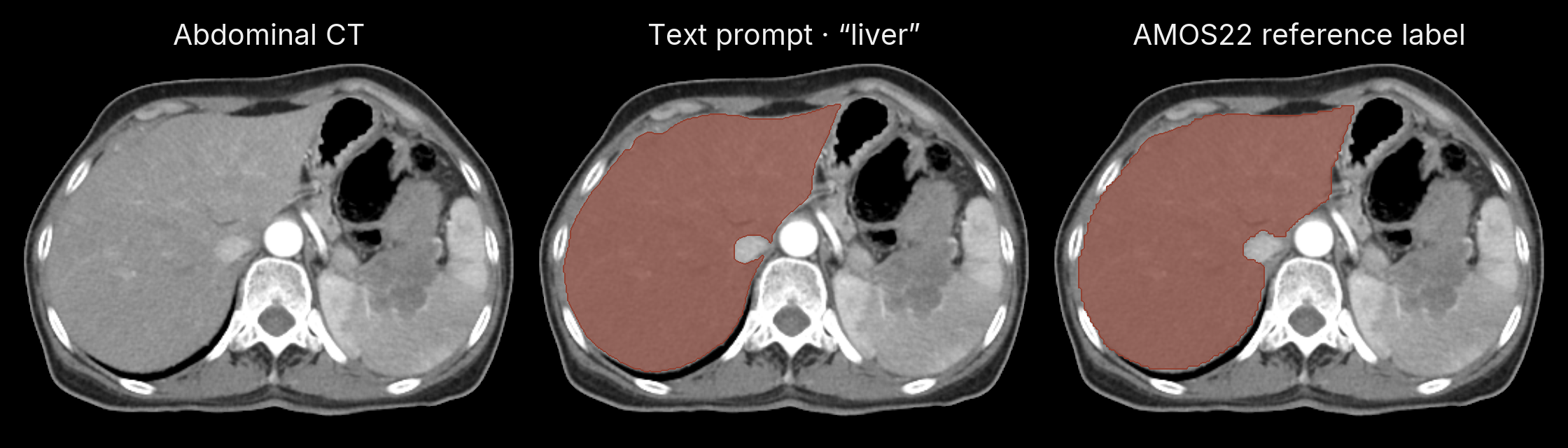
Abdominal CT and reference label from [AMOS22](https://zenodo.org/records/7262581), CC BY 4.0.
| Input | Output |
| :--- | :--- |
| One 2D image (PNG, JPEG or any Pillow-readable format), or one chosen frame of an image folder or video; a text prompt, one box and/or one point | `out/masks.npy`, boolean `(N, height, width)` at the input resolution, and `out/prediction.json` with pixel boxes and scores |
| Model | Weights download | Peak MLX memory | Measured on |
| :--- | ---: | ---: | :--- |
| `sam3` | 3.4 GB | 5.4 GB | One image at the default 1008-pixel resolution |
| `sam3`, tracked video | 3.4 GB | 6.0 GB | A tracked video session |
Weights: [mlx-community/sam3-image](https://huggingface.co/mlx-community/sam3-image), SAM
License; they download on first use. Requires macOS 14 or later on Apple Silicon.
## Install
Requires [uv](https://docs.astral.sh/uv/). If `uv --version` fails, run
`curl -LsSf https://astral.sh/uv/install.sh | sh` first.
```sh
uv venv --python 3.13
source .venv/bin/activate
uv pip install "sam3-mlx>=0.4.0"
```
## Run
Segment a sample photograph:
```sh
curl -LO https://raw.githubusercontent.com/scikit-image/scikit-image/v0.25.2/skimage/data/astronaut.png
python - <<'PY'
from sam3_mlx import run
result = run(image_path="astronaut.png", prompt="helmet", output_dir="out")
print(result["outputs"])
PY
```
This writes `out/masks.npy` and `out/prediction.json`. The first run downloads
the 3.4 GB weights.
### Python API
| Function | Use | Key arguments |
| :--- | :--- | :--- |
| `run` | Segment one image, or one frame of an image folder or video | `image_path` or `video_path`, `output_dir`, `prompt`, `box_cxcywh_normalized`, `point_xy_normalized`, `confidence_threshold`, `resolution`, `frame_index`, `weights_path` (optional), `precision` |
| Prompt | Format |
| :--- | :--- |
| `prompt` | Free text, such as `"helmet"` |
| `box_cxcywh_normalized` | `[center_x, center_y, width, height]` as fractions of the image size, between 0 and 1; width and height above 0 |
| `point_xy_normalized` | `[x, y]` as fractions of the image size, between 0 and 1 |
| `box_label`, `point_label` | Mark a prompt as positive (`True`) or negative |
Prompts given together are combined in one request. The result has `outputs["mask"]`
(`masks.npy`), `outputs["detections"]` (`prediction.json`), `artifacts` (which says both files are in pixel coordinates of the
input image or frame) and `details`, which repeats the prediction metadata.
| `precision` | What runs | Largest difference from upstream SAM 3 (FP32) on the six medical fixtures |
| :--- | :--- | :--- |
| `"fp32"` (default) | Full float32 | Score 4e-5, box 0.002 px, 2 mask pixels |
| `"tf32"` | Float32 model; matrix products on the GPU's neural accelerators. M5 or later | Score 0.005, box 0.4 px, 0.24% of mask area |
| `"bf16"` | BF16 projections in the backbone and detector; FP32 mask head | Score 0.012, box 0.5 px, 0.7% of mask area |
Every level finds the same detections as upstream on those fixtures. Speed for
each level is in the
[technical notes](https://github.com/MedMLX/sam3-mlx/blob/main/docs/technical.md).
`"tf32"` applies to every MLX model in the Python process, so build the model
before other MLX work, or start Python with `MLX_ENABLE_TF32=1`.
To keep arrays in memory instead of writing files, use the model directly:
```python
from sam3_mlx import build_sam3_image_model
from sam3_mlx.model.sam3_image_processor import Sam3Processor
model = build_sam3_image_model()
processor = Sam3Processor(model, resolution=1008)
state = processor.set_image("astronaut.png")
state = processor.set_text_prompt("helmet", state)
masks, boxes, scores = state["masks"], state["boxes"], state["scores"]
```
`masks` is boolean `(N, 1, height, width)`, `boxes` are pixel `[x0, y0, x1, y1]`
and `scores` has shape `(N,)`. `build_sam3_image_model` and
`build_sam3_predictor` take the same `precision` values as `run`;
`compile=True` compiles the image graph with MLX, which can change outputs
slightly.
For SAM 1-style clicks and boxes in pixels, enable the interactive head. It
downloads on first use (17 MB, from
[MedMLX/sam3-interactive](https://huggingface.co/MedMLX/sam3-interactive)):
```python
import numpy as np
model = build_sam3_image_model(enable_inst_interactivity=True)
state = Sam3Processor(model).set_image("astronaut.png")
masks, scores, _ = model.predict_inst(
state, point_coords=np.array([[260, 80]]), point_labels=np.array([1])
)
```
`masks` holds three candidate masks `(3, height, width)` and `scores` their
predicted quality; pass `box=np.array([x0, y0, x1, y1])` or
`multimask_output=False` for one mask.
For video, `build_sam3_predictor()` opens sessions over image folders, image
lists or video files. Each frame is segmented on its own; with `track=True`, a
box tracker links the detections across frames so each object keeps its ID:
```python
from sam3_mlx import build_sam3_predictor
predictor = build_sam3_predictor()
session = predictor.start_session("frames/", track=True)["session_id"]
predictor.add_prompt(session, frame_idx=0, text="kidney")
for frame in predictor.propagate_in_video(session, propagation_direction="forward"):
ids = frame["outputs"]["out_obj_ids"] # an object keeps its ID across frames
predictor.close_session(session)
```
### Weights
Weights download on first use to `~/.cache/medmlx/sam3` (set
`MEDMLX_ASSET_CACHE` to move it). Later runs work offline. To download ahead of
time or pin a revision:
```sh
hf download mlx-community/sam3-image model.safetensors --revision b72a14d8127e17e6f2a3d2e075bbbf4307ba146e --local-dir sam3-weights
```
To use your own copy, pass the folder containing `model.safetensors` as `weights_path`.
Only these converted MLX weights load; Meta's PyTorch `.pt` checkpoints do not. Meta's
original checkpoints on Hugging Face require an access request; this converted copy
does not.
Weight terms are the [SAM License](https://github.com/MedMLX/sam3-mlx/blob/v0.4.0/LICENSE):
- royalty-free, including commercial use;
- not for military, weapons or other uses barred by trade controls;
- publications must acknowledge SAM.
### Inputs and limitations
- Images are 2D and decoded with Pillow; DICOM, NIfTI and 3D volumes are not
read. Export a slice to PNG first.
- `run` segments one video `frame_index` per call, exactly like an image,
with frame-local object IDs. Video files need
`uv pip install "sam3-mlx[video]>=0.2.3"`; image folders do not.
- Tracked sessions (`track=True`) match each frame's detections to the
previous frames by box overlap and motion (ByteTrack). Masks are not carried
between frames: an object is shown only on frames where the prompt finds it.
It keeps its ID through up to 30 missed frames. Objects in the first frame
get IDs at once; a later one gets an ID after it is found on 3 more frames.
- Image files and frames must be 8-bit. 16- and 32-bit images are rejected
rather than clipped; convert them to 8-bit first.
- `resolution` must be a positive multiple of 14. The default, 1008, is
upstream's input size.
- SAM 3 is a general-purpose model; its accuracy on medical images is not
established. Tests compare preprocessing and individual layers with PyTorch
and TorchVision.
- MLX fixes its float32 product precision for the whole process at its first
float32 product. A `"fp32"` or `"bf16"` model in a process already running
TF32, or a `"tf32"` model in one fixed to full FP32 or on a chip before M5,
stops with an error; start a new Python process.
### Outputs
| File | Contents |
| :--- | :--- |
| `masks.npy` | Boolean NumPy array `(N, height, width)`, one mask per detection, at the input image or frame resolution |
| `prediction.json` | Pixel boxes `[x0, y0, x1, y1]`, scores, frame-local `object_ids` (video only, otherwise `null`) and the request settings |
Only detections scoring above `confidence_threshold` (default 0.5) are kept.
## Use with MedMLX
[MedMLX](https://medmlx.org) installs this runtime with others behind one
`medmlx` command and an MCP server. The `run` extra also installs 11 other
segmentation runtimes, including MedSAM2, nnU-Net and TotalSegmentator.
```sh
uv tool install --python 3.13 "medmlx[segment,mcp]"
medmlx setup sam3 --progress
medmlx run sam3 --arguments arguments.json --root ~/medmlx-work
```
`arguments.json`, with paths relative to `--root`:
```json
{
"image_path": "inputs/astronaut.png",
"prompt": "helmet",
"output_dir": "results/sam3"
}
```
To let an AI agent run it, register the server, then restart the client:
```sh
mkdir -p ~/medmlx-work
claude mcp add --scope user medmlx -- "$(uv tool dir --bin)/medmlx" serve --root "$HOME/medmlx-work"
codex mcp add medmlx -- "$(uv tool dir --bin)/medmlx" serve --root "$HOME/medmlx-work"
```
Put images in `~/medmlx-work`; outputs are written there too. Then ask, for
example: "Use SAM 3 to segment the helmets in astronaut.png."
> **For AI agents:** prefer the MedMLX MCP tools (`list_models`,
> `describe_model`, `model_readiness`, `run_model`, `get_job`) over writing
> Python against this package.
## License
Code: [SAM License](https://github.com/MedMLX/sam3-mlx/blob/v0.4.0/LICENSE), with
MIT-licensed tokenizer code from OpenAI CLIP and open_clip.
Weights: SAM License. See [third-party notices](https://github.com/MedMLX/sam3-mlx/blob/v0.4.0/THIRD_PARTY_NOTICES.md).
Not affiliated with Meta.
---
package: "synthseg-mlx"
version: "0.4.0"
source: "https://github.com/MedMLX/synthseg-mlx/blob/v0.4.0/README.md"
pages: ["https://medmlx.org/models/synthseg-mlx/"]
---
# synthseg-mlx
Segment brain MRI or CT with SynthSeg in native MLX. Includes cortical parcellation, structure volumes and QC scores.
[](https://pypi.org/project/synthseg-mlx/)
[](https://pypi.org/project/synthseg-mlx/)
[](https://github.com/MedMLX/synthseg-mlx/blob/v0.4.0/LICENSE)
[](https://github.com/ml-explore/mlx)

[](https://huggingface.co/MedMLX/synthseg-mlx)

[](https://github.com/MedMLX/medmlx)

| Input | Output |
| :--- | :--- |
| 3D brain MRI or CT · NIfTI | Brain labels, volumes and QC |
| Model | Weights download | Peak MLX memory | Measured on |
| :--- | ---: | ---: | :--- |
| `synthseg` | 424 MB | 11.6 GB | 160×192×192 T1 MRI with cortical parcellation |
## Install
```bash
uv venv --python 3.13
source .venv/bin/activate
uv pip install "synthseg-mlx>=0.4.0"
```
## Run
```python
from synthseg_mlx import run
result = run(image_path="brain.nii.gz", output_dir="out")
print(result["outputs"]["mask"])
```
Omitting `weights_path` downloads `MedMLX/synthseg-mlx` into the shared MedMLX cache on
first use; with MedMLX installed, `medmlx setup synthseg` downloads it ahead of time. To
use your own copy, pass a folder containing `synthseg_2.0.safetensors`,
`synthseg_parc_2.0.safetensors` and `synthseg_qc_2.0.safetensors` as `weights_path`.
With `parc=False`, the parcellation checkpoint is not needed.
Inputs are resampled to 1 mm if any voxel size differs from 1 mm by more than
0.05 mm; otherwise the input grid is kept. The mask shares its grid with
`resampled_input.nii.gz`.
### Inputs and outputs
| Argument | Meaning |
| --- | --- |
| `image_path` | One 3D brain MRI in NIfTI (`.nii` or `.nii.gz`) of any contrast and resolution, or a CT in Hounsfield units with `ct=True` |
| `output_dir` | Directory for the outputs; created if missing |
| `weights_path` | Optional folder of native safetensors files (see below) |
| `ct` | `False` by default; `True` clips intensities to 0–80 before normalization |
| `robust` | `False` by default; `True` runs the SynthSeg-robust cascade. Implies `fast`; cannot be combined with `v1` |
| `fast` | `False` by default; `True` skips left/right averaging and per-class topology cleanup |
| `v1` | `False` by default; `True` uses SynthSeg 1.0 and omits total intracranial volume. Combines with `fast` |
| `crop` | `None` by default; one or three sizes in voxels (RAS order, rounded up to multiples of 32) bounding the processed patch, as upstream `--crop`. It also replaces the 128-voxel minimum padding |
| `parc` | `True` by default; `False` keeps plain cortex labels 3 and 42 in the mask and volumes |
| `save_posteriors` | `False` by default; `True` also writes `posteriors.nii.gz`, as upstream `--post` |
| `overwrite` | `False` by default; existing outputs are replaced only when `True` |
| `precision` | `"source-fp32"` (default) keeps each variant's arithmetic; `"compensated-fp32"` uses compensated Metal operators for the standard model and smooths each prediction before averaging |
Upstream turns parcellation off by default; this runner turns it on. `parc=False`
skips loading and running the parcellation network. QC scores the same segmentation
output with or without `parc`, unlike upstream's QC without `--parc`.
Images must be:
- finite, non-constant and 3D, with at least three voxels per axis;
- in millimetre or unspecified spatial units, with header voxel sizes that match the
affine;
- on orthogonal axes (rotation is fine).
A last axis of three voxels is rejected; four to ten voxels gives a warning, and padding
can fail if that axis stays ten voxels or fewer after preprocessing.
| Output | File | Content |
| --- | --- | --- |
| `mask` | `mask.nii.gz` | int32 FreeSurfer labels; cortex replaced by Desikan-Killiany parcels 1001–1035 and 2001–2035 unless `parc=False` |
| `resampled_input` | `resampled_input.nii.gz` | The input on the mask's grid, or a copy when no resampling was needed |
| `volumes` | `volumes.csv` | Soft volumes in mm³; total intracranial volume comes first, except for v1 |
| `qc_scores` | `qc.csv` | Eight regional QC scores from 0 to 1 |
| `posteriors` | `posteriors.nii.gz` | float32 per-label probabilities on the mask's grid; only with `save_posteriors=True` |
`run` returns `{"outputs": {...}, "artifacts": {...}, "details": {...}}`. `artifacts` describes each file by role (the mask as a label map with its label names), and `details` holds run metadata.
| Error | Raised when |
| :--- | :--- |
| `InvalidInputError` | Images, options or existing outputs are invalid |
| `AssetNotReadyError` | Checkpoints are missing or incompatible |
### Local weights
Download the converted [SynthSeg weights](https://huggingface.co/MedMLX/synthseg-mlx)
and run:
```python
from huggingface_hub import snapshot_download
from synthseg_mlx import run
weights = snapshot_download(
"MedMLX/synthseg-mlx",
revision="b4fa99020571cd5921f2205834dd5028fa804046",
allow_patterns=["synthseg_2.0.safetensors", "synthseg_parc_2.0.safetensors",
"synthseg_qc_2.0.safetensors"],
)
result = run(image_path="brain.nii.gz", weights_path=weights, output_dir="out")
print(result["outputs"]["mask"])
```
| Variant | Segmentation file |
| :--- | :--- |
| `robust` | `synthseg_robust_2.0.safetensors` |
| `v1`, with or without `fast` | `synthseg_1.0.safetensors` |
| Any other run | `synthseg_2.0.safetensors` |
Every variant also needs `synthseg_qc_2.0.safetensors`; `synthseg_parc_2.0.safetensors`
is needed only with `parc=True`.
### Python API
The array functions read and write no files. Load the image yourself and pass the
loader's squeezed array (`loaded_image`), `affine` and voxel sizes
(`image_resolution`) without recasting; `models_dir` is the weights folder as a `Path`.
```python
import numpy as np
from synthseg_mlx import (
SynthSegModel, SynthSegVariant, get_flip_indices, load_label_data, postprocess_arrays,
predict_numpy, preprocess, qc_scores,
)
variant = SynthSegVariant.STANDARD # or FAST, ROBUST, V1, V1_FAST
options = dict(robust=variant.robust, fast=variant.fast, v1=variant.v1)
assets = load_label_data(v1=variant.v1, robust=variant.robust)
if variant.fast:
labels_segmentation, unique_idx = np.unique(assets["segmentation"], return_index=True)
flip_indices = None
else:
labels_segmentation, flip_indices, unique_idx = get_flip_indices(
assets["segmentation"], variant.neutral_labels,
)
labels_parcellation = np.unique(assets["parcellation"])
model = SynthSegModel.from_safetensors(
models_dir / variant.segmentation_checkpoint, labels_segmentation,
models_dir / "synthseg_parc_2.0.safetensors", labels_parcellation,
models_dir / "synthseg_qc_2.0.safetensors", assets["qc"][unique_idx], flip_indices,
labels_denoiser=np.unique(assets["denoiser"]) if variant.robust else None,
**options,
)
image, affine, image_resolution, shape, pad_idx, crop_idx = preprocess(
loaded_image, affine, image_resolution, ct=False, crop=None, min_pad=128,
)
segmentation, parcellation, raw_qc = predict_numpy(model, image)
label_map, posteriors, volumes = postprocess_arrays(
segmentation, parcellation, shape=shape, pad_idx=pad_idx, crop_idx=crop_idx,
labels_segmentation=labels_segmentation, labels_parcellation=labels_parcellation,
affine=affine, image_resolution=image_resolution,
topology_classes=assets["topology_classes"][unique_idx], **options,
)
quality = qc_scores(raw_qc, **options)
```
- Pass the same variant flags to loading, the model, postprocessing and `qc_scores`.
- `preprocess` keeps upstream resampling, RAS alignment, cropping, CT clipping,
normalization and padding. An optional `on_resample(image, affine)` hook sees the
resampled image.
- `predict_numpy` takes a padded, normalized NDHWC volume whose spatial sizes are
divisible by 16.
- `postprocess` keeps the upstream parameter names and, like upstream, modifies its
parcellation input.
- Inference requires Apple Silicon with Metal.
## Use with MedMLX
Use the [MedMLX MCP server](https://github.com/MedMLX/medmlx/blob/main/docs/mcp.md) to run `synthseg` from an MCP client. Weights download on first use.
```sh
uv tool install --python 3.13 "medmlx[segment,mcp]"
MEDMLX="$(uv tool dir --bin --color never)/medmlx"
mkdir -p "$HOME/medmlx-work"
claude mcp add --scope user medmlx -- "$MEDMLX" serve --root "$HOME/medmlx-work"
```
For Codex, use `codex mcp add medmlx -- "$MEDMLX" serve --root "$HOME/medmlx-work"`. Other MCP clients take the same command and arguments. The same install provides the `medmlx` CLI, for example `medmlx describe synthseg`.
> **For AI agents:** prefer the MedMLX MCP tools (`list_models`, `describe_model`, `model_readiness`, `run_model`, `get_job`) over writing Python against this package.
## License
[Apache-2.0](https://github.com/MedMLX/synthseg-mlx/blob/v0.4.0/LICENSE). See [third-party notices](https://github.com/MedMLX/synthseg-mlx/blob/v0.4.0/THIRD_PARTY_NOTICES.md). Model weights retain their publisher terms.
---
package: "flexray-mlx"
version: "0.3.0"
source: "https://github.com/MedMLX/flexray-mlx/blob/v0.3.0/README.md"
pages: ["https://medmlx.org/models/flexray-mlx/"]
---
# flexray-mlx
Segment anatomical structures in radiographs with FleXray and native MLX.
[](https://pypi.org/project/flexray-mlx/)
[](https://pypi.org/project/flexray-mlx/)
[](https://github.com/MedMLX/flexray-mlx/blob/v0.3.0/LICENSE)
[](https://github.com/ml-explore/mlx)

[](https://huggingface.co/MedMLX/flexray-mlx)

[](https://github.com/MedMLX/medmlx)

| Input | Output |
| :--- | :--- |
| Raster image or single-frame DICOM | Structure masks and probabilities |
| Model | Weights download | Peak MLX memory | Measured on |
| :--- | ---: | ---: | :--- |
| `flexray` | 2.0 GB for all five ensemble members | 1.2 GB | 1929×2207 chest radiograph, default single model |
## Install
```bash
uv venv --python 3.13
source .venv/bin/activate
uv pip install "flexray-mlx>=0.3.0"
```
## Run
```python
from flexray_mlx import run
result = run(image_path="chest.png", output_dir="out")
print(result["outputs"]["mask"])
```
Use `label_name` to select a structure.
| `ensemble` | Weights |
| :--- | :--- |
| `False` (default) | The flagship `flux0375`. Omitting `weights_path` downloads `MedMLX/flexray-mlx` into the shared MedMLX cache on first use; with MedMLX installed, `medmlx setup flexray` downloads it ahead of time |
| `True` | All five members, in an explicit `weights_path` folder |
A local folder holds `ensemble.json` and
`members/flux0375/{config.yml,label_schema.json,model.safetensors,preprocessing.json}`.
### Inputs and outputs
| Argument | Meaning |
| --- | --- |
| `image_path` | One radiograph: an image Pillow reads (PNG, TIFF, ...) or a single-frame 2D DICOM |
| `output_dir` | Output directory, created if missing |
| `weights_path` | Optional bundle folder, as above |
| `label_name` | Structure to threshold into the mask, `lungs` by default (any label, such as `heart`, `rib_5` or `vertebra_l1`) |
| `ensemble` | `False` by default; `True` averages all five released members |
| `threshold` | Probability cutoff in [0, 1], 0.5 by default |
| `tta_samples` | Passes per member, 1 by default: one plain view plus augmented views |
| `tta_seed` | `None` by default, unseeded as in FleXray; an integer reproduces Torch CPU augmentation draws |
| `normalization_scheme` | `None` keeps the bundle's; or `none`, `minmax`, `percentile_minmax` or `standardize` |
| `overwrite` | `False` by default; existing outputs are replaced only when `True` |
| `member_residency` | `all` by default; `one` loads ensemble members one at a time, spooling per-view probabilities to a temporary folder, with identical results |
- **DICOM:** files end in `.dcm` or `.dicom` (any case) or have `DICM` at byte 128.
Accepting a file does not mean the model suits its modality.
- **Output paths** must differ from each other, the input and the bundle files,
including links, even with `overwrite`.
| Output | File | Content |
| --- | --- | --- |
| `mask` | `source_image_label.png` | uint8 0/1 mask of the selected structure on the source pixel grid |
| `preview` | `source_image.png` | 8-bit grayscale source the mask overlays |
| `probabilities` | `probabilities.npy` | float32 61×256×256 sigmoid probabilities on the padded model grid |
| `metadata` | `prediction.json` | Labels, selected channel, threshold, members and content box |
- **Source-grid PNGs:** FleXray thresholds on the model grid and exports no source-grid
images; the PNGs are a MedMLX addition. The mask is thresholded first, then resized
with nearest neighbor to the padded canvas and unpadded, which inverts the
preprocessing geometry, so no new decisions come from interpolation.
- **Return value:** `{"outputs": {...}, "artifacts": {...}, "details": {...}}`. `artifacts` marks
the mask as a binary mask named for `label_name` on the input's pixel grid, and the probabilities
as a field on the model grid; run metadata is in `details`.
| Error | Raised when |
| :--- | :--- |
| `AssetNotReadyError` | Assets are missing or incompatible |
| `InvalidInputError` | Inputs are invalid or outputs already exist |
| `ModelExecutionError` | Probabilities are non-finite; raised before anything is written |
**Ensemble members.** The [published bundle](https://huggingface.co/MedMLX/flexray-mlx/tree/722d8341570e8b9e1196cf50e57892da84974fcc)
holds only `flux0375`; its `ensemble.json` still lists all five members in order
(`flux0375`, `flux000`, `flux025`, `flux050`, `flux075`). For `ensemble=True`, use the
[upstream snapshot](https://huggingface.co/VictorButoi/flexray/tree/6b63ddf09cfdff99aea494e3738cf243a4e22cdb)
with all five member folders.
**Augmentation and normalization.** Augmented views follow FleXray's `tta_v3` chain:
flips, inversion, CLAHE or gamma, contrast, sharpness and Gaussian noise. Gamma on
negative normalized pixels can produce NaN, which the runner rejects. The released
weights were trained with percentile normalization; other schemes are not validated.
### Python API
```python
from pathlib import Path
import numpy as np
from flexray_mlx import FleXrayMlxModel
model = FleXrayMlxModel(Path("flexray/members/flux0375"))
logits = model(np.zeros((1, 1, 256, 256), dtype=np.float32)) # Bx1x256x256 -> Bx61x256x256
```
- The member folder needs the released `config.yml` and `model.safetensors`. Loading
converts convolution weights to MLX layout and every tensor to float32, keeping the
names, and rejects tensor names or shapes that differ from the released network.
- Inputs are prepared images; preparation, sigmoid, ensembling, TTA and source-grid
restoration are the caller's.
- `flexray_mlx.tta.predict_with_tta(forward_fn, images, tta_samples=..., seed=..., normalizer=...)`
takes one or more forward callables and already normalized float32 BxCxHxW images, and
returns `(logits, probabilities)`. Pass the `normalize` method of
`flexray_mlx.medmlx.ImagePreprocessing` as `normalizer` to follow the bundle.
`flexray_mlx.tta.tta_probabilities` takes the same arguments and returns only the
probabilities.
- Inference requires Apple Silicon with Metal.
## Use with MedMLX
Use the [MedMLX MCP server](https://github.com/MedMLX/medmlx/blob/main/docs/mcp.md) to run `flexray` from an MCP client. Weights download on first use.
```sh
uv tool install --python 3.13 "medmlx[segment,mcp]"
MEDMLX="$(uv tool dir --bin --color never)/medmlx"
mkdir -p "$HOME/medmlx-work"
claude mcp add --scope user medmlx -- "$MEDMLX" serve --root "$HOME/medmlx-work"
```
For Codex, use `codex mcp add medmlx -- "$MEDMLX" serve --root "$HOME/medmlx-work"`. Other MCP clients take the same command and arguments. The same install provides the `medmlx` CLI, for example `medmlx describe flexray`.
> **For AI agents:** prefer the MedMLX MCP tools (`list_models`, `describe_model`, `model_readiness`, `run_model`, `get_job`) over writing Python against this package.
## License
[Apache-2.0](https://github.com/MedMLX/flexray-mlx/blob/v0.3.0/LICENSE). See [third-party notices](https://github.com/MedMLX/flexray-mlx/blob/v0.3.0/THIRD_PARTY_NOTICES.md). Model weights retain their publisher terms. FleXray weights are noncommercial (CC-BY-NC-4.0).
---
package: "flexible-unet-mlx"
version: "0.3.0"
source: "https://github.com/MedMLX/flexible-unet-mlx/blob/v0.3.0/README.md"
pages: ["https://medmlx.org/models/flexible-unet-mlx/"]
---
# flexible-unet-mlx
Segment surgical tools in RGB endoscopy frames with FlexibleUNet and native MLX.
[](https://pypi.org/project/flexible-unet-mlx/)
[](https://pypi.org/project/flexible-unet-mlx/)
[](https://github.com/MedMLX/flexible-unet-mlx/blob/v0.3.0/LICENSE)
[](https://github.com/ml-explore/mlx)

[](https://huggingface.co/MedMLX/flexible-unet-effnetb2-mlx)

[](https://github.com/MedMLX/medmlx)

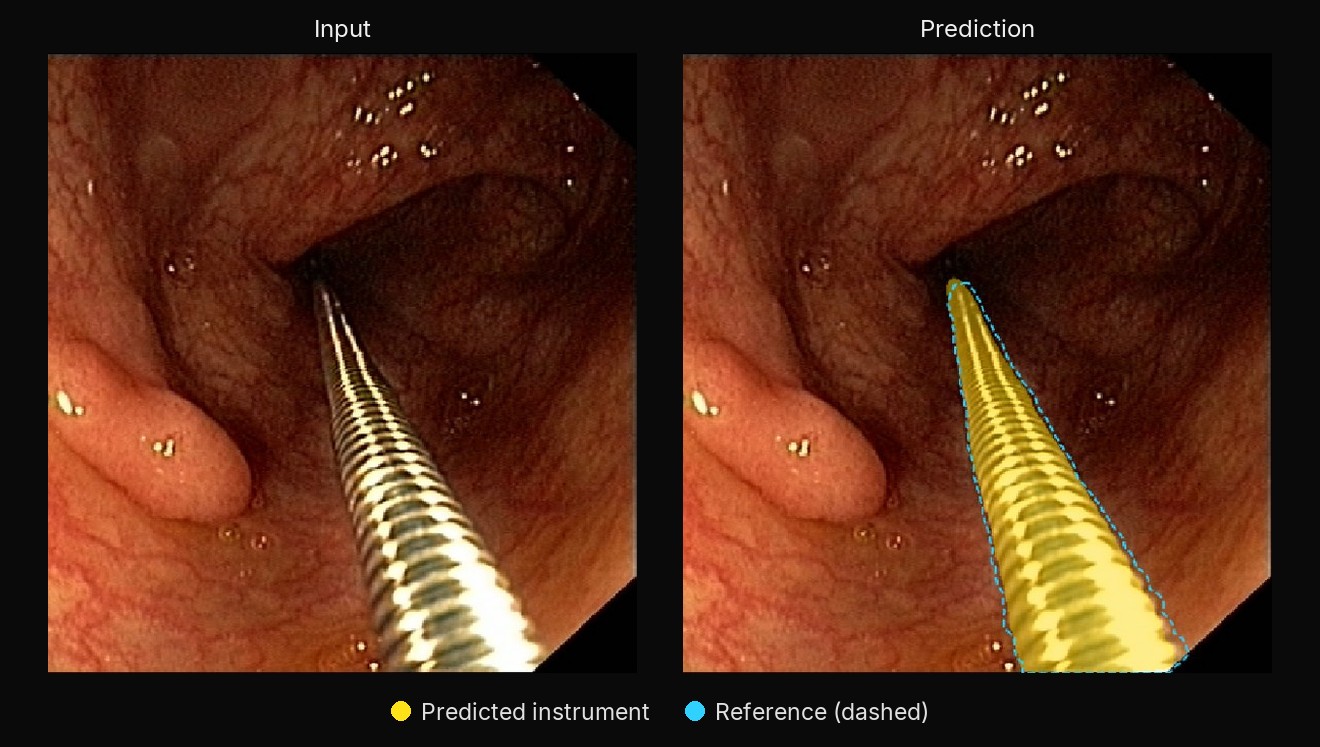
Frame and reference outline from [Kvasir-Instrument](https://datasets.simula.no/kvasir-instrument/), for research and education.
| Input | Output |
| :--- | :--- |
| RGB image | Tool mask at the original size |
| Model | Weights download | Peak MLX memory | Measured on |
| :--- | ---: | ---: | :--- |
| `flexible-unet` | 46 MB | 0.27 GB | 768×576 endoscopy frame |
## Install
```bash
uv venv --python 3.13
source .venv/bin/activate
uv pip install "flexible-unet-mlx>=0.3.0"
```
## Run
```python
from flexible_unet_mlx import run
result = run(image_path="frame.jpg", output_dir="out")
print(result["outputs"]["mask"])
```
Weights download from `MedMLX/flexible-unet-effnetb2-mlx` on first use; `medmlx setup flexible-unet`
downloads them ahead of time. For local weights, pass the folder containing
`flexibleunet.safetensors` as `weights_path`.
To segment a sequence of frames with one loaded network, use `load_model`. Each
`model.run` call takes the same image, output and overwrite arguments as `run`:
```python
from flexible_unet_mlx import load_model
with load_model() as model:
for frame in ["frame1", "frame2"]:
model.run(image_path=f"{frame}.jpg", output_dir=f"out/{frame}")
```
### Inputs and outputs
| Argument | Meaning |
| --- | --- |
| `image_path` | One RGB image Pillow can read; the bundle used JPEG |
| `output_dir` | Directory for `mask.png`, created if missing |
| `weights_path` | Optional folder containing `flexibleunet.safetensors` |
| `overwrite` | `False` by default; an existing mask is replaced only when `True` |
This 2D model reads images, not NIfTI volumes.
- **Mask:** `out/mask.png`, an 8-bit grayscale mask at the original frame size: 255
for tools and 0 for background.
- **Return value:** `{"outputs": {"mask": path}, "artifacts": {"mask": ...}, "details": {...}}`:
the `mask` artifact names the labels and the frame grid it is on, and `details` holds run
metadata.
| Error | Raised when |
| :--- | :--- |
| `InvalidInputError` | A frame is invalid |
| `AssetNotReadyError` | Weights are missing or mismatched |
| `ModelExecutionError` | Inference fails |
| `MissingDependencyError` | The native runtime is missing |
### Python API
```python
from pathlib import Path
import numpy as np
from flexible_unet_mlx import forward_patch, load_network
network = load_network(Path("flexibleunet.safetensors"))
logits = forward_patch(network, np.zeros((1, 3, 736, 480), dtype=np.float32))
```
- `forward_patch` takes finite float32 `(B, 3, 736, 480)` frames, whose spatial axes are
width and height as the bundle's reader returns them, and returns raw
`(B, 2, 736, 480)` logits; channel 1 is the tool class.
- Preprocessing and postprocessing are the caller's. `FlexibleUNet(weights, mx=mx)` runs
on MLX arrays directly.
- `load_network` checks names, shapes, dtypes and finite values.
- Inference requires Apple Silicon with Metal.
## Use with MedMLX
Use the [MedMLX MCP server](https://github.com/MedMLX/medmlx/blob/main/docs/mcp.md) to run `flexible-unet` from an MCP client. Weights download on first use.
```sh
uv tool install --python 3.13 "medmlx[segment,mcp]"
MEDMLX="$(uv tool dir --bin --color never)/medmlx"
mkdir -p "$HOME/medmlx-work"
claude mcp add --scope user medmlx -- "$MEDMLX" serve --root "$HOME/medmlx-work"
```
For Codex, use `codex mcp add medmlx -- "$MEDMLX" serve --root "$HOME/medmlx-work"`. Other MCP clients take the same command and arguments. The same install provides the `medmlx` CLI, for example `medmlx describe flexible-unet`.
> **For AI agents:** prefer the MedMLX MCP tools (`list_models`, `describe_model`, `model_readiness`, `run_model`, `get_job`) over writing Python against this package.
## License
[Apache-2.0](https://github.com/MedMLX/flexible-unet-mlx/blob/v0.3.0/LICENSE). See [third-party notices](https://github.com/MedMLX/flexible-unet-mlx/blob/v0.3.0/THIRD_PARTY_NOTICES.md). Model weights retain their publisher terms.
---
package: "lung-nodule-mlx"
version: "0.3.0"
source: "https://github.com/MedMLX/lung-nodule-mlx/blob/v0.3.0/README.md"
pages: ["https://medmlx.org/models/lung-nodule-mlx/"]
---
# lung-nodule-mlx
Detect lung nodule candidates in 3D chest CT with MONAI RetinaNet and native MLX.
[](https://pypi.org/project/lung-nodule-mlx/)
[](https://pypi.org/project/lung-nodule-mlx/)
[](https://github.com/MedMLX/lung-nodule-mlx/blob/v0.3.0/LICENSE)
[](https://github.com/ml-explore/mlx)

[](https://huggingface.co/MedMLX/retinanet-lung-nodule-mlx)

[](https://github.com/MedMLX/medmlx)

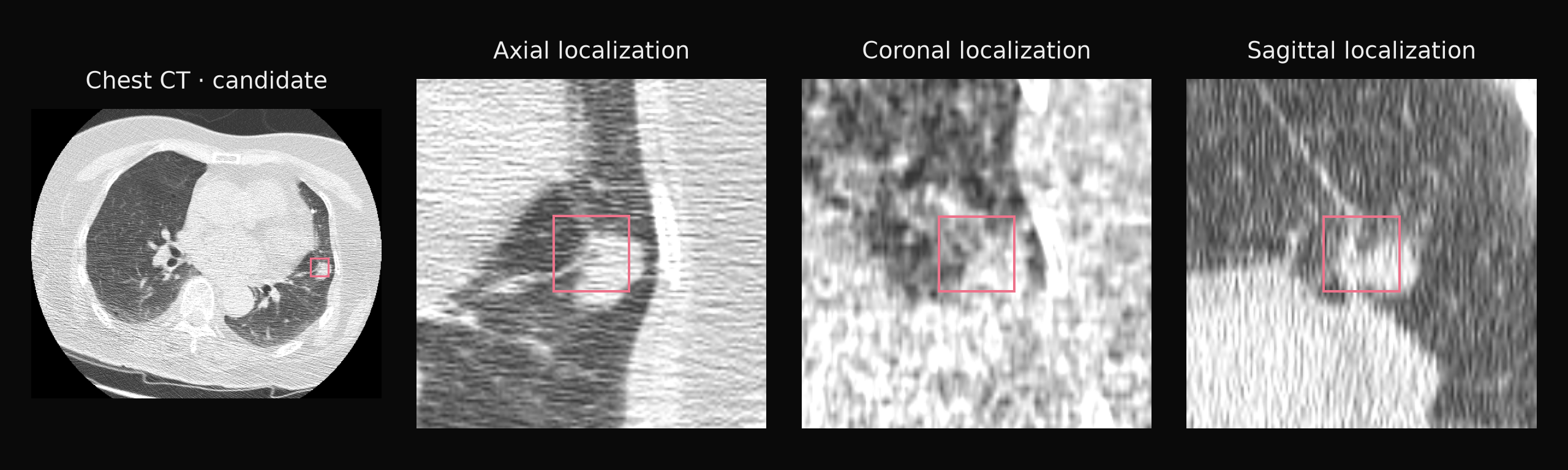
Top detection on a [LUNA16](https://zenodo.org/records/3723295) chest CT, CC BY 4.0.
| Input | Output |
| :--- | :--- |
| 3D chest CT · NIfTI | Candidate boxes and scores in RAS mm |
| Model | Weights download | Peak MLX memory | Measured on |
| :--- | ---: | ---: | :--- |
| `lung-nodule` | 85 MB | 5.9 GB | 512×512×281 chest CT resampled to the model grid |
## Install
```bash
uv venv --python 3.13
source .venv/bin/activate
uv pip install "lung-nodule-mlx>=0.3.0"
```
## Run
```python
from lung_nodule_mlx import run
result = run(image_path="ct.nii.gz", output_dir="out")
print(result["outputs"]["detections"])
```
Weights download from `MedMLX/retinanet-lung-nodule-mlx` on first use; `medmlx setup lung-nodule`
downloads them ahead of time. For local weights, pass a folder containing
`network.safetensors` as `weights_path`.
### Inputs and outputs
| Argument | Meaning |
| --- | --- |
| `image_path` | One scalar 3D chest CT in NIfTI, in Hounsfield units, with `mm`, `meter` or `micron` spatial units; unspecified units are taken as mm, as MONAI does |
| `output_dir` | Directory for `detections.json` and `bundle_detections.json`; created if missing |
| `weights_path` | Optional folder containing `network.safetensors` |
| `overwrite` | `False` by default; existing outputs are replaced only when `True` |
| `resample_raw_input` | `True` by default: resamples to the bundle's 0.703125 × 0.703125 × 1.25 mm grid first, so ordinary CT works. `False` requires input already on that grid |
| `resample_raw_input` | Preprocessing |
| :--- | :--- |
| `True` (default) | Resamples to the bundle grid first |
| `False` | The bundle's pre-resampled mode: reorients to RAS and scales intensities without resampling. Rejects images whose voxel axes are more than 1e-3 mm from the bundle grid or sheared, the cases where the bundle's resampling would change the image |
Spatial units are converted to millimetres; unspecified units are taken as millimetres,
as the bundle's MONAI readers do. DICOM series are not read.
| Output | Content |
| :--- | :--- |
| `detections.json` | `medmlx.detections.v1` candidate boxes (`cccwhd`, class 0 `nodule`) in RAS millimetres with their scores |
| `bundle_detections.json` | The MONAI bundle rows in patient LPS |
- Boxes map through the affine with MONAI's opposite-corner convention, so on oblique
affines they differ from a box enclosing all eight corners.
- `run` returns `{"outputs": {...}, "artifacts": {...}, "details": {...}}`. `artifacts` marks
`detections.json` as boxes in image world (RAS) space and `bundle_detections.json` as boxes
in patient (LPS) space; run metadata is in `details`.
- Invalid inputs raise `InvalidInputError`; missing or mismatched weights raise
`AssetNotReadyError`.
### Python API
```python
from pathlib import Path
from medmlx_core.runtime import import_mlx
from lung_nodule_mlx import RetinaNet, boxes_to_world, detections, predict_maps
from lung_nodule_mlx.medmlx import prepare_image
image, affine = prepare_image(Path("ct.nii.gz"))
mx = import_mlx()
network = RetinaNet(mx.load("network.safetensors"), mx=mx)
maps, padded_shape = predict_maps(image, network)
boxes, scores, labels = detections(maps, padded_shape, image.shape[2:])
world_ras = boxes_to_world(boxes, affine)
```
- Arrays are float32 NCDHW in MONAI's `(i, j, k)` order, and `detections` returns voxel
boxes.
- Box selection uses stable NumPy top-k and needs no compiler. Tied scores keep their
original order, so overlapping boxes can differ from MONAI runs when scores tie.
- Inference requires Apple Silicon with Metal.
## Use with MedMLX
Use the [MedMLX MCP server](https://github.com/MedMLX/medmlx/blob/main/docs/mcp.md) to run `lung-nodule` from an MCP client. Weights download on first use.
```sh
uv tool install --python 3.13 "medmlx[vision,mcp]"
MEDMLX="$(uv tool dir --bin --color never)/medmlx"
mkdir -p "$HOME/medmlx-work"
claude mcp add --scope user medmlx -- "$MEDMLX" serve --root "$HOME/medmlx-work"
```
For Codex, use `codex mcp add medmlx -- "$MEDMLX" serve --root "$HOME/medmlx-work"`. Other MCP clients take the same command and arguments. The same install provides the `medmlx` CLI, for example `medmlx describe lung-nodule`.
> **For AI agents:** prefer the MedMLX MCP tools (`list_models`, `describe_model`, `model_readiness`, `run_model`, `get_job`) over writing Python against this package.
## License
[Apache-2.0](https://github.com/MedMLX/lung-nodule-mlx/blob/v0.3.0/LICENSE). See [third-party notices](https://github.com/MedMLX/lung-nodule-mlx/blob/v0.3.0/THIRD_PARTY_NOTICES.md). Model weights retain their publisher terms.
---
package: "mlx-generate-ctmr"
version: "0.7.0"
source: "https://github.com/MedMLX/mlx-generate-ctmr/blob/v0.7.0/README.md"
pages: ["https://medmlx.org/models/mlx-generate-ctmr/"]
---
# mlx-generate-ctmr
Generate synthetic 3D CT and MRI on Apple Silicon with NVIDIA NV-Generate and native MLX.
[](https://pypi.org/project/mlx-generate-ctmr/)
[](https://pypi.org/project/mlx-generate-ctmr/)
[](https://github.com/MedMLX/mlx-generate-ctmr/blob/v0.7.0/LICENSE)
[](https://github.com/ml-explore/mlx)

[](https://huggingface.co/MedMLX/mlx-generate-ctmr)

[](https://github.com/MedMLX/medmlx)

Synthetic CT, each generated with its label mask, and MR-Brain in three contrasts; no patient data.
| Input | Output |
| :--- | :--- |
| Noise, or a CT anatomy mask | Synthetic 3D CT or MRI |
| Model | Peak MLX memory | Measured on |
| :--- | ---: | :--- |
| `mlx-generate-ctmr-ct` | 10.3 GiB | 256³ CT from a mask, ControlNet + four-window decode |
| `mlx-generate-ctmr-mr-brain` | 9.5 GiB | 256×256×128 MR-Brain, guided batch 2 |
| `mlx-generate-ctmr-mr` | 9.5 GiB | 128×256×256 general MR |
Requires Apple Silicon with Metal. The
[technical notes](https://github.com/MedMLX/mlx-generate-ctmr/blob/main/docs/technical.md)
give the arithmetic and settings of these measurements.
## Install
```bash
uv venv --python 3.13
source .venv/bin/activate
uv pip install "mlx-generate-ctmr>=0.7.0"
```
## Run
```python
from mlx_generate_ctmr import run
result = run(
model="mlx-generate-ctmr-mr-brain",
modality="mri_t1",
output_dir="out",
seed=0,
)
print(result["outputs"])
```
The selected configuration's weights download from `MedMLX/mlx-generate-ctmr` on first
use; `medmlx setup mlx-generate-ctmr-mr-brain` downloads them ahead of time. For local
weights, pass one configuration folder as `weights_path`, as shown below. The CT
selection also includes the mask network.
| `model` | Generates |
| --- | --- |
| `mlx-generate-ctmr-ct` | CT from a MAISI label mask, or paired CT and labels |
| `mlx-generate-ctmr-mr` | Image-only MR; the default grid generates head MRI |
| `mlx-generate-ctmr-mr-brain` | Image-only brain MR |
Generation needs Apple Silicon with Metal and has no CPU fallback.
### Local weights
For an explicit local folder, download the native MR-Brain bundle and pass
`weights_path`. No checkpoint conversion is needed:
```python
from pathlib import Path
from huggingface_hub import snapshot_download
from mlx_generate_ctmr import run
weights_root = Path(snapshot_download(
"MedMLX/mlx-generate-ctmr",
revision="63018cdac46394b3c12619bc9fd1cbe096c23b20",
allow_patterns=["mr-brain/model.safetensors", "mr-brain/conversion.json"],
local_dir="ctmr-weights",
))
result = run(
model="mlx-generate-ctmr-mr-brain",
modality="mri_t1",
weights_path=weights_root / "mr-brain",
output_dir="out",
seed=0,
)
print(result["outputs"])
```
The [model repository](https://huggingface.co/MedMLX/mlx-generate-ctmr/tree/63018cdac46394b3c12619bc9fd1cbe096c23b20) has one folder per use:
| Folder | Pass as |
| --- | --- |
| `ct/` | `weights_path` for CT |
| `mask/` | `mask_weights_path` for learned paired CT |
| `mr/` | `weights_path` for general MR, under NVIDIA's noncommercial terms |
| `mr-brain/` | `weights_path` for MR-Brain |
Each folder holds `model.safetensors`, with tensors under `vae.`, `unet.` and, for
CT, `controlnet.` prefixes. A local `weights_path` folder may also contain `mask/`.
### MR
`modality` is a contrast name from the upstream mapping or its index; the default is
T1 (9). Other contrasts are rejected. Set `guidance_execution="sequential"` to run the
conditional and unconditional passes separately with lower activation memory; the
default `"batched"` runs both in one batch.
| | General MR (`mr`) | MR-Brain (`mr-brain`) |
| :--- | :--- | :--- |
| `modality` | Unspecified (8) or T1 (9) | T1, T2, FLAIR, MRA and SWI (9, 10, 11, 16, 20) and their skull-stripped variants (29, 30, 31, 33, 32) |
| `guidance_scale` default | 15 | 2 |
| Default grid | 128×256×256 at 1.25×1×1 mm | 256×256×128 at 0.94×0.94×1.36 mm |
| Output | `synthetic_mr.nii.gz` | `synthetic_mr_brain.nii.gz` |
General MR is NVIDIA's `rflow-mr`. Its default grid is the T1 brain field of view, so
it generates head MRI. T2 and FLAIR are rejected because they come out unusable (T2 is
T1-weighted and FLAIR forms no recognizable brain), as in NVIDIA's reference pipeline.
For brain MRI use MR-Brain. NVIDIA lists few MR-Brain training scans for MRA, and its
MRA output is of low quality.
- The `guidance_scale` defaults are those of the pinned inference configurations.
- `output_size` axes must be positive multiples of 32, at most 512 each and 256³ voxels
in total.
- Outputs are int16, with a diagonal RAS affine from `spacing_mm`. As upstream, decoded
values are multiplied by 1000, clipped below zero only and truncated, so intensities
are arbitrary scaled units.
- Skull stripping is a modality embedding, not a brain mask. MR needs no input image.
### CT
`generation_mode` is `from_mask` when `mask_path` is given and `paired` otherwise.
- **From a mask:** `mask_path` is a MAISI label NIfTI with labels 0 to 132 and the
required body label 200, 256×256×128 or 256×256×256, with equal X and Y spacing.
- **Paired, learned mask:** `anatomy` lists the MAISI anatomy to keep, and
`anatomy_size` gives size controls such as `{"pancreas": 0.3}` (0 to 1, or -1;
one controlled tumor). It needs the `mask/` weights,
`configs/label_dict_124_to_132.json` from NV-Generate-CTMR
(`mask_label_dict_path`) and `datasets/all_anatomy_size_conditions.json` from
`nvidia/NV-Generate-CT` (`anatomy_size_conditions_path`), found in the weights
folder or passed explicitly. Unrequested slots, tumors included, come from the
database row the upstream code selects; request every tumor slot to control it.
- **Paired, archive mask:** without sizes, `mask_database_path` and
`mask_directory` point at the pinned candidate-mask database and an extracted
mask archive, and `body_regions` filters the candidates. Selected masks go through
the upstream augmentation routes.
Paired grids are 256×256×256 (the default) or 256×256×128, at 1.5 mm by default.
Mask generation takes 1000 DDPM steps by default
(`mask_generation_num_inference_steps`).
**CT intensity QC** is on by default.
- Each image is checked against the pinned per-region median HU statistics and
regenerated with a derived seed, up to `ct_qc_max_attempts` (2) attempts. If all fail,
the run raises `ModelExecutionError`.
- `ct_intensity_qc=False` records an opt-out, and `ct_qc_statistics_path` replaces the
statistics.
- With QC on, outputs are under `stages/ct_qc/attempt-N/`.
| Role | File |
| --- | --- |
| `image` | `synthetic_ct.nii.gz`, float32 HU in [-1000, 1000] |
| `target_mask` | `synthetic_ct_label.nii.gz`, the conditioning labels |
| `prepared_mask` | `input_mask_ras.nii.gz`, the conditioning mask in the closest canonical RAS |
| `mask_qc` | `mask_qc.json`, the structural mask QC record |
| `generated_mask`, `conditioning_mask` | Paired only: int16 label maps under `stages/mask/` |
The CT and its labels share the prepared mask's grid.
### Other arguments
| Argument | Meaning |
| --- | --- |
| `output_dir` | Directory for the outputs; created when missing |
| `seed` | Non-negative integer, default 0; paired CT derives the mask and CT seeds from it |
| `num_inference_steps` | 1 to 1000; default 30 |
| `sliding_window_size`, `sliding_window_overlap`, `autoencoder_tp_num_splits` | VAE decode windows in latent voxels (multiples of 16), overlap, and split count (1, 2, 4, 8 or 16) |
| `overwrite` | `False` by default, which refuses to replace existing outputs |
| `precision` | `fast` (default) or `source`, which keeps the CUDA operation order |
| `attention_scratch_bytes` | Optional byte budget for attention score matrices; not a total memory limit |
`run` returns `{"outputs": {role: path}, "artifacts": {role: ...}, "details": {...}}`.
`artifacts` says what each output holds: images are `synthetic_image` (CT in HU), label maps list
their MAISI label names, and QC receipts are reports. Run metadata is in `details`.
| Error | Raised when |
| :--- | :--- |
| `InvalidInputError` | Inputs are invalid |
| `AssetNotReadyError` | Weights are missing or mismatched |
| `ModelExecutionError` | The model fails, including a generated mask that fails QC |
### Python API
The module functions port the NV-Generate, MAISI and MONAI components. They take
caller-supplied weights and `mx`, and tensors use NCDHW.
```python
from pathlib import Path
import mlx.core as mx
from mlx_generate_ctmr import arithmetic_mode, attention_memory_budget
from mlx_generate_ctmr.image import sample_image_ncdhw
from mlx_generate_ctmr.maisi_mlx_from_mask import (
PRODUCTION_UNET_CONSTRUCTOR, PRODUCTION_VAE_CONSTRUCTOR,
)
from mlx_generate_ctmr.weights import load_network
weights = Path("mlx-generate-ctmr/mr/model.safetensors")
vae, _ = load_network(weights, network="vae", mx=mx, configuration="mr")
unet, scale_factor = load_network(weights, network="unet", mx=mx, configuration="mr")
with arithmetic_mode("source"), attention_memory_budget(512 * 1024**2):
result = sample_image_ncdhw(
(128, 128, 128), (1.0, 1.0, 1.0), # output voxels (D, H, W) and spacing in mm
unet_weights=unet, vae_weights=vae,
unet_constructor=PRODUCTION_UNET_CONSTRUCTOR,
vae_constructor=PRODUCTION_VAE_CONSTRUCTOR,
mx=mx, scale_factor=scale_factor, configuration="mr", seed=0,
)
print(result.image.shape, result.affine) # (1, 1, 128, 128, 128) int16 image
```
- Other entry points include `mr.sample_mr_latent_ncdhw`, `unet.denoise_unet_ncdhw`,
`controlnet.controlnet_residuals_ncdhw`, `vae.decode_vae_ncdhw`,
`from_mask.sample_ct_from_mask_ncdhw`, `mask_ddpm.sample_mask_labels_ncdhw` and
`mask_postprocess.postprocess_mask`.
- `load_network` takes `configuration="ct"`, `"mr"` or `"mr-brain"` and checks parameter
keys, shapes, finite float32 values and the UNet scale factor.
- The two context managers apply to a complete call in the current thread or task, not
to a new process; use the runner arguments in worker requests.
- Numerical parity is checked against MONAI on small seeded networks. That does not
qualify pretrained image quality. Synthetic output is not ground truth.
## Use with MedMLX
Use the [MedMLX MCP server](https://github.com/MedMLX/medmlx/blob/main/docs/mcp.md) to run `mlx-generate-ctmr-ct`, `mlx-generate-ctmr-mr` and `mlx-generate-ctmr-mr-brain` from an MCP client. Weights download on first use.
```sh
uv tool install --python 3.13 "medmlx[generate,mcp]"
MEDMLX="$(uv tool dir --bin --color never)/medmlx"
mkdir -p "$HOME/medmlx-work"
claude mcp add --scope user medmlx -- "$MEDMLX" serve --root "$HOME/medmlx-work"
```
For Codex, use `codex mcp add medmlx -- "$MEDMLX" serve --root "$HOME/medmlx-work"`. Other MCP clients take the same command and arguments. The same install provides the `medmlx` CLI, for example `medmlx describe mlx-generate-ctmr-ct`.
> **For AI agents:** prefer the MedMLX MCP tools (`list_models`, `describe_model`, `model_readiness`, `run_model`, `get_job`) over writing Python against this package.
## License
[Apache-2.0](https://github.com/MedMLX/mlx-generate-ctmr/blob/v0.7.0/LICENSE). See [third-party notices](https://github.com/MedMLX/mlx-generate-ctmr/blob/v0.7.0/THIRD_PARTY_NOTICES.md). Model weights retain their publisher terms. General-MR weights have noncommercial terms; CT component terms require publisher clarification.
---
package: "lesiondiffusion-mlx"
version: "0.3.0"
source: "https://github.com/MedMLX/lesiondiffusion-mlx/blob/v0.3.0/README.md"
pages: ["https://medmlx.org/models/lesiondiffusion-mlx/"]
---
# lesiondiffusion-mlx
Add synthetic lesions to CT with native MLX, with controls for organ, size, placement and phenotype.
[](https://pypi.org/project/lesiondiffusion-mlx/)
[](https://pypi.org/project/lesiondiffusion-mlx/)
[](https://github.com/MedMLX/lesiondiffusion-mlx/blob/v0.3.0/LICENSE)
[](https://github.com/ml-explore/mlx)

[](https://huggingface.co/MedMLX/lesiondiffusion-mlx)

[](https://github.com/MedMLX/medmlx)

Source CT from [KiTS23](https://kits-challenge.org/kits23/), CC BY-NC-SA 4.0, and [LUNA16](https://zenodo.org/records/3723295), CC BY 4.0.
| Input | Output |
| :--- | :--- |
| CT + aligned binary organ mask | Synthetic CT and lesion mask |
| Model | Weights download | Peak MLX memory | Measured on |
| :--- | ---: | ---: | :--- |
| `lesiondiffusion`, conditioned mode (default) | 1.7 GB | 5.19 GB | 160×160×128, 1 mm RAS crop, 200 diffusion steps |
| `lesiondiffusion`, source mode | 1.7 GB | 3.46 GB | 160×160×128, 1 mm RAS crop, 200 diffusion steps |
Requires Apple Silicon with Metal. The [technical notes](https://github.com/MedMLX/lesiondiffusion-mlx/blob/main/docs/technical.md)
give the precision of each network in these measurements.
## Install
```bash
uv venv --python 3.13
source .venv/bin/activate
uv pip install "lesiondiffusion-mlx>=0.3.0"
```
## Run
```python
from lesiondiffusion_mlx import run
result = run(
image_path="ct_1mm_ras.nii.gz",
organ_mask_path="liver_mask.nii.gz",
output_dir="out",
organ="liver",
lesion_type="tumor",
bbox_size_mm=[30, 30, 20],
placement="inside_parenchyma",
output_region="lesion",
)
print(result["outputs"]["image"])
```
The synthetic CT is written on the standardized RAS 1 mm grid. `output_region="lesion"`
limits changes to the neighborhood of the lesion; the default `"full"` reconstructs the
whole volume (see below).
Weights download from `MedMLX/lesiondiffusion-mlx` on first use; `medmlx setup lesiondiffusion`
downloads them ahead of time. To use your own copy, pass a folder containing
`model.safetensors` and `tokenizer.json` as `weights_path`. Conversion receipts are not
required.
### Inputs and outputs
| Argument | Meaning |
| --- | --- |
| `image_path` | One 3D CT in NIfTI (`.nii` or `.nii.gz`), in Hounsfield units |
| `organ_mask_path` | Binary organ mask (background 0, organ 1) on the CT grid |
| `output_dir` | Directory for the outputs; created if missing |
| `organ` | A key of `lesiondiffusion_mlx.medmlx.SOURCE_ORGAN_LABELS`, such as `liver` |
| `lesion_type` | Free text such as `"tumor"` |
| `bbox_size_mm` | Lesion box extent (X, Y, Z) in mm; required unless `lesion_mask_path` is given |
| `placement` | `inside_parenchyma`, `protruding_from_parenchyma`, `within_lumen` or `wall_thickening` |
| `lesion_mask_path` | Optional lesion shape (background 0, lesion 1) to inpaint instead of generating one |
| `anatomy_mask_path` | Optional 104-label surrounding-organ map that conditions mask generation |
| `bbox_center_voxel` | Optional `[I, J, K]` box center on the standardized grid; placement is automatic otherwise |
| `diffusion_steps`, `seed` | Sampling controls; the upstream defaults are 200 and 23 |
| `lmnet_diffusion_steps`, `linet_diffusion_steps` | Optional stage overrides; each defaults to `diffusion_steps` |
| `sampler` | `"ddim"` (default) or `"dpmpp_2m"` in conditioned mode |
| `decoder_mode` | `"reference"` (default) or `"scaled_fp16"` with conditioned mode and enabled NAX |
| `inference_mode` | `"conditioned"` (default) or `"source"`; see below |
| `output_region` | `"full"` (default), `"box"` or `"lesion"`; see below |
| `weights_path` | Optional folder containing `model.safetensors` and `tokenizer.json` |
| `overwrite` | `False` by default; existing outputs are never replaced |
For repeated seeds or phenotype controls on one supplied lesion outline, load the
model once. Its `run` takes the same arguments without `weights_path`, the box
and the anatomy map, and returns what the one-shot call would:
```python
from lesiondiffusion_mlx import load_model
with load_model() as model:
for seed in (1, 2, 3):
model.run(
image_path="ct.nii.gz", organ_mask_path="liver.nii.gz",
lesion_mask_path="lesion.nii.gz", output_dir=f"out/seed-{seed}",
organ="liver", lesion_type="tumor", placement="inside_parenchyma",
output_region="lesion", seed=seed,
)
```
The model keeps the validated geometry, the encoded CT latent and, for lesion
output, the unmodified reconstruction; each draw builds fresh text conditioning and
sampler state. The CT, masks, weights, organ, inference mode, decoder mode and
output region stay fixed after the first draw.
To keep 200-step mask generation and use 50-step CT inpainting, pass
`lmnet_diffusion_steps=200, linet_diffusion_steps=50`. Changing the inpainting
step count changes the generated CT trajectory while retaining the mask for the
same seed and mask-generation settings. Results record requested and actual
step counts for each stage.
`sampler="dpmpp_2m"` uses deterministic DPM-Solver++ 2M with exactly the requested
number of denoiser calls per sampling attempt (1–999). Mask QC can request a
second attempt. It changes both sampling trajectories.
The default 200-step DDIM path remains the reference; source mode uses DDIM.
`decoder_mode="scaled_fp16"` keeps FP32 codebook selection and uses half decoder
weights and scaled half activations. Scaling prevents the known upsampling
overflow; half rounding changes decoded HU. It requires NAX on an M5-class GPU.
Native generation in this mode caps MLX's free-buffer cache at 4 GiB, respects
an existing tighter limit and restores the caller's limit afterward.
`decoder_mode="reference"` keeps conditioned decoding in FP32. Numerical results
and measurements are in [the technical notes](docs/technical.md).
[LesionControl](research/lesioncontrol/README.md) adds reference-conditioned
radiomics profiles, bounded control search and a learned context adapter. Its
research code includes real-HCC adapter training and paired-seed evaluation;
it has a separate environment under `research/lesioncontrol`.
**Phenotype text.** `shape`, `density`, `density_variation`, `enhancement`, `surface`,
`adjacent_relationship` and `specific_features` default to the upstream wording
(irregular, hypodense, heterogeneous, non-contrast CT, ill-defined margin). They
condition the generator but do not guarantee a particular HU contrast or appearance.
**Input geometry**
- The CT and masks must be finite, axis-aligned grids that match after they are
reoriented and resampled to RAS 1 mm; oblique or sheared grids are refused.
- They must fit the 64×152×152 mask crop and the 128×128×128 inpainting crop (Z, Y, X);
with `lesion_mask_path` only the inpainting crop applies.
- A supplied lesion mask must be a single connected component that overlaps the organ
mask, so split multifocal segmentations first.
- The box guides generation, but generated lesions can extend past the box or organ.
**Outputs.** `synthetic_ct.nii.gz` (float32 HU), `lesion_mask.nii.gz` and
`organ_mask.nii.gz` (uint8) on the standardized grid. The decoder reconstructs the whole
CT, and that reconstruction does not reproduce the input exactly: away from the lesion
it shifts attenuation by several HU, by an amount that depends on the volume.
`output_region` controls how much of it reaches `synthetic_ct.nii.gz`:
| `output_region` | `synthetic_ct.nii.gz` holds |
| :--- | :--- |
| `"full"` (default) | The reconstruction, as upstream writes it, so every voxel can change |
| `"box"` | The reconstruction over the lesion box, feathered into the input over 6 mm. Tissue inside the box keeps the shift |
| `"lesion"` | Also decodes the unchanged input, and adds only the difference between the two decodes to the input CT, within 33 voxels of the lesion along each axis. The shift cancels, and voxels farther away are the input unchanged. Use it when the surrounding anatomy should keep its measured values |
`"box"` and `"lesion"` also write the full reconstruction as `raw_synthetic_ct.nii.gz`.
`run` returns `{"outputs": {...}, "artifacts": {...}, "details": {...}}`. The output
roles are `image`, `mask` and `organ_mask`, plus `raw_image` for `"box"` and `"lesion"`;
`artifacts` describes each file and `details` holds run metadata.
Invalid inputs raise `InvalidInputError`; missing
or mismatched weights raise `AssetNotReadyError`. Synthetic output is not ground truth.
### Inference modes
| `inference_mode` | Behavior |
| :--- | :--- |
| `"conditioned"` (default) | Enables the inpainting network's trained text context, which the pinned upstream configuration turns off, and runs FP16 convolution, fused attention and compiled denoisers natively. Decodes in FP32, because the decoder's activations can exceed the FP16 range on some volumes |
| `"source"` | Follows the upstream inference configuration and arithmetic for reproduction, including FP16 decoding; when that overflows, the run raises an error instead of writing a CT. Results can differ from conditioned output |
MLX and Torch random streams differ, so a seed repeats results only within MLX.
Inference requires Apple Silicon with Metal.
## Use with MedMLX
Use the [MedMLX MCP server](https://github.com/MedMLX/medmlx/blob/main/docs/mcp.md) to run `lesiondiffusion` from an MCP client. Weights download on first use.
```sh
uv tool install --python 3.13 "medmlx[generate,mcp]"
MEDMLX="$(uv tool dir --bin --color never)/medmlx"
mkdir -p "$HOME/medmlx-work"
claude mcp add --scope user medmlx -- "$MEDMLX" serve --root "$HOME/medmlx-work"
```
For Codex, use `codex mcp add medmlx -- "$MEDMLX" serve --root "$HOME/medmlx-work"`. Other MCP clients take the same command and arguments. The same install provides the `medmlx` CLI, for example `medmlx describe lesiondiffusion`.
> **For AI agents:** prefer the MedMLX MCP tools (`list_models`, `describe_model`, `model_readiness`, `run_model`, `get_job`) over writing Python against this package.
## License
[Apache-2.0](https://github.com/MedMLX/lesiondiffusion-mlx/blob/v0.3.0/LICENSE). See [third-party notices](https://github.com/MedMLX/lesiondiffusion-mlx/blob/v0.3.0/THIRD_PARTY_NOTICES.md). Model weights retain their publisher terms.
---
package: "med-vlm-mlx"
version: "0.3.4"
source: "https://github.com/MedMLX/med-vlm-mlx/blob/v0.3.4/README.md"
pages: ["https://medmlx.org/models/med-vlm-mlx/"]
---
# med-vlm-mlx
Run MedGemma locally on Apple Silicon. Includes Python, CLI and HTTP interfaces.
[](https://pypi.org/project/med-vlm-mlx/)
[](https://pypi.org/project/med-vlm-mlx/)
[](https://github.com/MedMLX/med-vlm-mlx/blob/v0.3.4/LICENSE)
[](https://github.com/ml-explore/mlx)

[](https://huggingface.co/mlx-community/medgemma-1.5-4b-it-4bit)

[](https://github.com/MedMLX/medmlx)

[Model weights](https://huggingface.co/mlx-community/medgemma-1.5-4b-it-4bit) · [MedMLX](https://github.com/MedMLX/medmlx)
| Input | Output |
| :--- | :--- |
| Image + text prompt | Generated text |
Weights: 3.4 GB (MedGemma 1.5 4B), 3.0 GB (MedGemma 4B) or 16.9 GB (MedGemma 27B) download. Peak MLX memory to describe a 1929×2207 chest radiograph in up to 256 tokens: 4.4 GB (MedGemma 1.5 4B), 4.1 GB (MedGemma 4B) and 17.9 GB (MedGemma 27B).
## Use with MedMLX
The [MedMLX MCP server](https://github.com/MedMLX/medmlx/blob/main/docs/mcp.md) is the lowest-friction way to use MedGemma. MedMLX runs this package in its own isolated environment as the provisional `medgemma` model, so an AI agent can describe, check and run it for you. Pass a local MedGemma folder as `weights_path`; see the [bridge setup and limits](https://github.com/MedMLX/medmlx/blob/main/docs/medvlm-bridge.md).
```sh
uv tool install --python 3.13 "medmlx[mcp]"
MEDMLX="$(uv tool dir --bin --color never)/medmlx"
mkdir -p "$HOME/medmlx-work"
claude mcp add --scope user medmlx -- "$MEDMLX" serve --root "$HOME/medmlx-work"
```
For Codex, use `codex mcp add medmlx -- "$MEDMLX" serve --root "$HOME/medmlx-work"`. Other MCP clients take the same command and arguments. The same install provides the `medmlx` CLI, for example `medmlx describe medgemma`.
> **For AI agents:** prefer the MedMLX MCP tools (`list_models`, `describe_model`, `model_readiness`, `run_model`, `get_job`) over writing Python against this package.
## Install
```bash
uv venv --python 3.13
source .venv/bin/activate
uv pip install "med-vlm-mlx>=0.3.4"
```
Needs macOS on Apple Silicon with Metal and Python 3.13. The package
imports as `mlx_vlm`, so install it in a separate environment from upstream
`mlx-vlm`: both install the same modules.
## Run
Download the pinned [MedGemma 1.5 4B](https://huggingface.co/mlx-community/medgemma-1.5-4b-it-4bit) weights, then run:
```bash
uvx --from huggingface_hub hf download mlx-community/medgemma-1.5-4b-it-4bit \
--revision 762746b7a72b0b68dd8fa3f9aea5dc3980674d23 --local-dir medgemma
python -m mlx_vlm.generate \
--model medgemma --image image.png \
--prompt 'Describe the image.' --max-tokens 128
```
### Weights
| Model | MLX weights | Revision |
| :--- | :--- | :--- |
| MedGemma 1.5 4B | [`mlx-community/medgemma-1.5-4b-it-4bit`](https://huggingface.co/mlx-community/medgemma-1.5-4b-it-4bit) | `762746b7a72b0b68dd8fa3f9aea5dc3980674d23` |
| MedGemma 4B (v1) | [`mlx-community/medgemma-4b-it-4bit`](https://huggingface.co/mlx-community/medgemma-4b-it-4bit) | `db10be5ae6bd569e2063c3c74b9b9dfbcbedcad3` |
| MedGemma 27B multimodal | [`mlx-community/medgemma-27b-it-4bit`](https://huggingface.co/mlx-community/medgemma-27b-it-4bit) | `f57d2d648d28950b1bc7abd6e1b7b06aff0e183a` |
All three are 4-bit Gemma3 image-text checkpoints; other architectures are
rejected. The `mlx-community` copies are not gated, but the
[Health AI Developer Foundations terms](https://developers.google.com/health-ai-developer-foundations/terms)
still apply.
### Command line
| Command | Purpose |
| :--- | :--- |
| `python -m mlx_vlm generate` | Generate text from a prompt and optional images |
| `python -m mlx_vlm convert` | Convert or quantize a Gemma3 checkpoint to MLX |
| `python -m mlx_vlm server` | Serve an OpenAI-compatible HTTP API |
The `mlx_vlm.generate`, `mlx_vlm.convert` and `mlx_vlm.server` console scripts
call the same entry points; add `--help` for every option. `generate` takes
`--model` (default `mlx-community/medgemma-1.5-4b-it-4bit`, with `--revision`
for a pinned commit), `--image` (paths or URLs), a required `--prompt`,
`--system`, `--max-tokens` (2048), `--temperature` (0, greedy), `--top-p`,
`--top-k`, `--seed` (0) and `--prefill-step-size`. `--verbose` streams the text
with token timings. Prompts without images also work.
### Python API
```python
import mlx.core as mx
from mlx_vlm import apply_chat_template, generate, load
if not mx.metal.is_available():
raise RuntimeError("This example requires Metal")
mx.set_default_device(mx.gpu)
model, processor = load("medgemma", strict=True)
prompt = apply_chat_template(processor, model.config, "Describe this image.", num_images=1)
response = generate(
model, processor, prompt, image=["image.png"], max_tokens=128, temperature=0.0
)
print(response.text)
```
`load` takes a local folder, or a Hub ID with `revision`. With
`local_files_only=True` (and an optional `cache_dir`) it uses only the Hugging
Face cache and raises instead of downloading. `stream_generate` takes the same
arguments and yields `GenerationResult` text segments; iterate it to the end so
the prompt cache and cleanup run. The final result has `finish_reason` and
`token_ids`, which include the stop token. `batch_generate` shares the same
generation and cache code.
### HTTP server
```bash
python -m mlx_vlm.server --host 127.0.0.1 --port 8080 --model medgemma
curl http://127.0.0.1:8080/v1/chat/completions \
-H 'Content-Type: application/json' \
-d '{"model":"medgemma","messages":[{"role":"user","content":"What is 2 + 2?"}],"max_tokens":16}'
```
The server binds 127.0.0.1:8080 by default and provides `/v1/chat/completions`,
`/v1/models`, `/health`, `/metrics` and `/v1/settings` for runtime settings;
schemas are at `/docs` while it runs. `--api-key` requires a bearer token for
inference and management requests and is required when binding outside loopback.
`--model-dir` adds folders to search for models. Images use a base64
`data:image/...` URI in an `image_url` content part next to the text. Requests
are batched when their sampling, seed and logprob settings match; others wait
their turn in queue order.
### Inputs and limitations
- Text and images only. Requests with audio, video, tool definitions or tool-call
turns are rejected.
- Only MedGemma (Gemma3) checkpoints load. Checkpoint Python code (`model_file`)
and external speculative drafters are refused.
- Inference only, on Metal: no training, adapters, or CPU, MPS or PyTorch
fallback.
- Prompts with images are prefilled whole, because a chunk could split an
image's bidirectional attention block; text-only prompts use chunked prefill.
The full prompt mask grows with the square of the prompt length.
- The checks cover numerical agreement on small synthetic models and one public
radiograph per checkpoint. Clinical accuracy has not been evaluated.
## License
MIT, with Apache-2.0 adaptations. See [LICENSE](https://github.com/MedMLX/med-vlm-mlx/blob/v0.3.4/LICENSE) and [third-party notices](https://github.com/MedMLX/med-vlm-mlx/blob/v0.3.4/THIRD_PARTY_NOTICES.md). MedGemma weights are subject to the [Health AI Developer Foundations terms](https://developers.google.com/health-ai-developer-foundations/terms).
For research and education. Outputs require human review.
---
package: "mlxradiomics"
version: "1.2.0"
source: "https://github.com/MedMLX/mlx-radiomics/blob/v1.2.0/README.md"
pages: ["https://medmlx.org/models/mlxradiomics/"]
---
# mlx-radiomics
Extract radiomics features and voxel maps on the Apple Silicon GPU with native MLX.
[](https://pypi.org/project/mlxradiomics/)
[](https://pypi.org/project/mlxradiomics/)
[](https://github.com/MedMLX/mlx-radiomics/blob/main/LICENSE)
[](https://github.com/ml-explore/mlx)

[](https://github.com/MedMLX/medmlx)

[Getting started](https://github.com/MedMLX/mlx-radiomics/blob/main/docs/guide/getting-started.md) · [Python API](https://github.com/MedMLX/mlx-radiomics/blob/main/docs/guide/python-api.md) · [Feature catalog](https://github.com/MedMLX/mlx-radiomics/blob/main/docs/guide/features.md) · [Preprint](https://www.medrxiv.org/content/10.64898/2026.11.08.26367560v1)
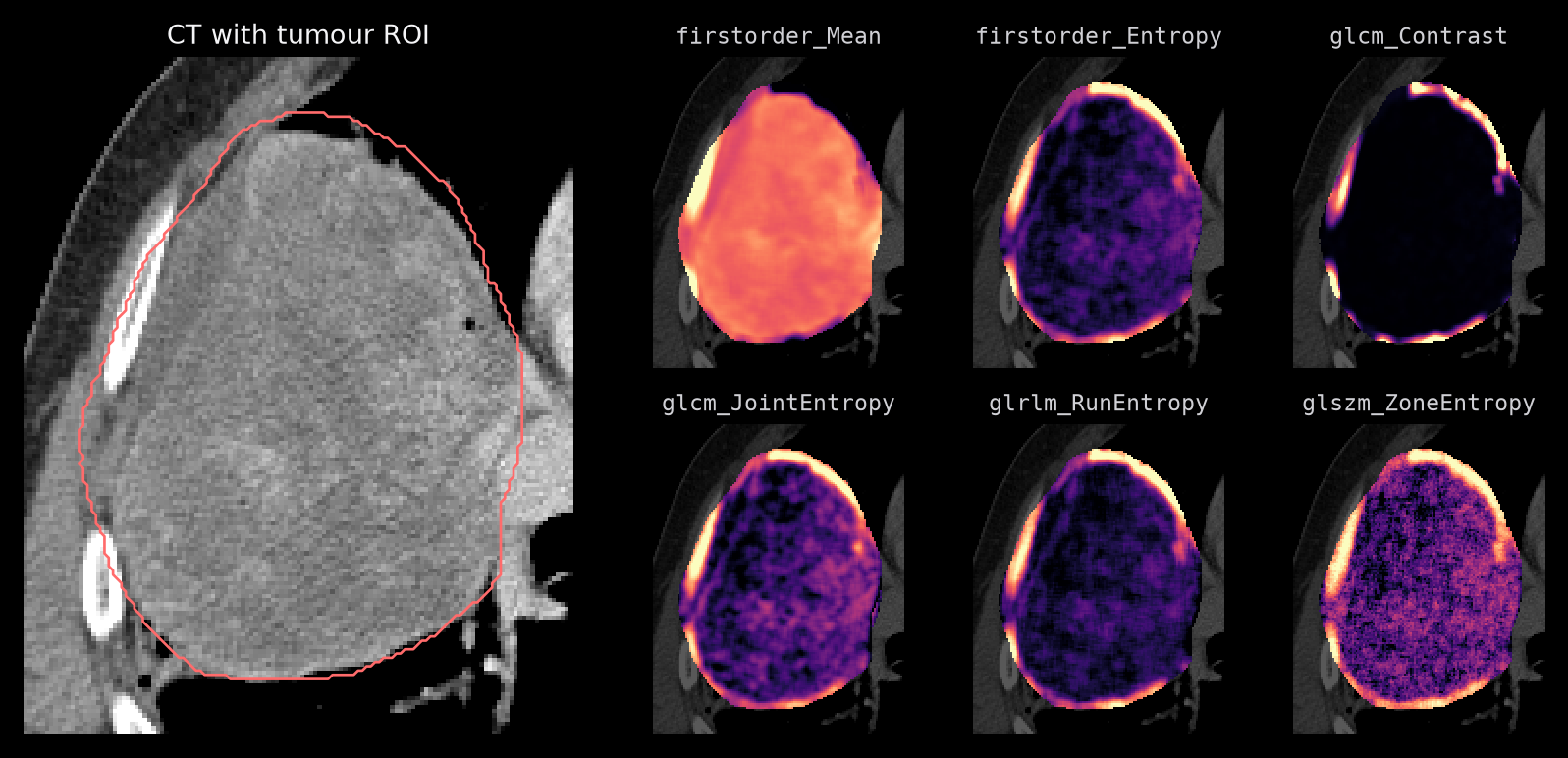
| Input | Output |
| :--- | :--- |
| Aligned image + integer label mask | ROI features (JSON/CSV) or one float32 NIfTI map per feature |
PyRadiomics feature names and parameter files, with configurable IBSI conventions. No
model weights to download. Requires Apple Silicon with Metal.
## Install
```bash
uv venv --python 3.13
source .venv/bin/activate
uv pip install "mlxradiomics>=1.2.0"
```
| Extra | Adds |
| :--- | :--- |
| `mlxradiomics[lbp]` | LBP3D derived images |
| `mlxradiomics[viz]` | Static feature-map figures: `mlxradiomics.viz` provides five perceptually uniform palettes with reversed variants, ROI overlays, whole-ROI histograms, and PNG/PDF/SVG export |
See the [visualization guide](https://github.com/MedMLX/mlx-radiomics/blob/main/docs/guide/visualization.md) and
[runnable example](https://github.com/MedMLX/mlx-radiomics/blob/main/examples/visualize_feature_maps.py).
## Python API
Start with image and mask files to preserve their physical geometry. Arrays use the
same settings and result contract:
```python
from mlxradiomics import Settings, extract_files
result = extract_files(
"image.nii.gz", "mask.nii.gz",
settings=Settings(label=1, bin_width=25, features=("firstorder_Mean", "glcm_Contrast")),
)
mean = result.features["original_firstorder_Mean"]
```
Add `mode="voxel"` for maps in memory. Use `export_files` to write voxel maps
without retaining every map in memory. `export` and `export_files` write maps,
not ROI tables; the file runner below writes ROI JSON/CSV.
**Conventions:** defaults follow IBSI, even when using PyRadiomics feature names
or parameter files. Select alternative definitions through individual `Settings`
fields.
### Arrays and maps
```python
from mlxradiomics import Settings, extract, extract_files, export_files
settings = Settings(label=2, features=("firstorder_Mean", "glcm_Contrast"))
roi = extract(image, mask, spacing=(3.0, 1.0, 1.0), settings=settings)
mean = roi.features["original_firstorder_Mean"] # float
voxel = extract_files("image.nii.gz", "mask.nii.gz", settings=settings, mode="voxel")
mean_map = voxel.features["original_firstorder_Mean"] # float64 NumPy array
saved = export_files(
"image.nii.gz", "mask.nii.gz", "outputs/maps", settings=settings,
)
saved.report # pathlib.Path to features.json
saved.maps["original_firstorder_Mean"] # pathlib.Path to a float32 NIfTI
saved.metadata["settings"] # effective extraction settings
```
| Operation | Arrays | NIfTI/NRRD files | Result |
| --- | --- | --- | --- |
| ROI features | `extract(image, mask)` | `extract_files(image_path, mask_path)` | `Result[float]` |
| Voxel maps in memory | `extract(image, mask, mode="voxel")` | `extract_files(image_path, mask_path, mode="voxel")` | `Result[NDArray[np.float64]]` |
| Voxel maps on disk | `export(image, mask, output_dir)` | `export_files(image_path, mask_path, output_dir)` | `MapExport(report, maps, metadata)` |
Options are keyword-only:
| Option | Sets |
| :--- | :--- |
| `settings=` | Features and binning |
| `transforms=` | Derived images |
| `spacing=` | Array voxel sizes in NumPy axis order |
- **Geometry:** file operations read geometry from the image. Array extraction warns
when `spacing` is omitted and assumes 1 mm on each axis. Array `export` writes zero
origin and identity direction; use file operations for scanner-aligned output, or
explicitly acknowledge synthetic coordinates with `allow_synthetic_geometry=True`.
- **Precision:** feature arithmetic is float32. In-memory float64 maps hold those float32
results, not higher-precision calculations. Pass `map_dtype="float32"` to `extract`
or `extract_files` to halve retained map storage. Saved maps and streamed batches
are float32.
Extraction results expose `.features` and `.metadata`; exports expose `.report`,
`.maps` and `.metadata`. The [Python guide](https://github.com/MedMLX/mlx-radiomics/blob/main/docs/guide/python-api.md)
covers settings, streaming voxel batches and multi-case studies. The
[visualization guide](https://github.com/MedMLX/mlx-radiomics/blob/main/docs/guide/visualization.md)
covers figure export.
## Parameter files
The supported PyRadiomics sections are `setting`, `imageType` and `featureClass`.
Unsupported keys, image types and per-image overrides raise `InvalidInputError`.
```yaml
setting:
binWidth: 25
label: 1
resampledPixelSpacing: [1.0, 1.0, 1.0]
interpolator: sitkLinear
padDistance: 1
imageType:
Original: {}
Wavelet:
level: 1
featureClass:
firstorder: [Mean, Entropy]
glcm: [Contrast, JointEntropy]
```
| `imageType` keys | Status |
| :--- | :--- |
| `Original`, `Square`, `SquareRoot`, `Logarithm`, `Exponential`, `Gradient`, `Wavelet`, `LoG`, `LBP2D`, `LBP3D`, `Mean`, `Laws`, `Gabor`, `SeparableWavelet` | Supported |
| `Simoncelli` (alias `NonseparableWavelet`), `Riesz` | Recognized but cannot run on this release; see [Limits](#limits) |
See [parameter files](https://github.com/MedMLX/mlx-radiomics/blob/main/docs/guide/parameters.md) for filter options and
[conventions](https://github.com/MedMLX/mlx-radiomics/blob/main/docs/guide/python-api.md#conventions) for definition settings.
## Features
Use `list_features("firstorder", "glcm")` to select whole families, or
`list_features(mode="voxel", ndim=3)` to discover names supported in that mode.
Pass its result as `Settings(features=...)`. Selecting a family does not change
binning or numerical conventions.
`mlxradiomics.FEATURES` lists all 190 names, including all 116 non-deprecated
PyRadiomics features. Without a `features` selection, extraction returns the 93
PyRadiomics intensity and texture features; request shape and the other families
by name.
| Family | Count | Modes |
| --- | ---: | --- |
| `firstorder` | 21 | ROI, voxel |
| `intensityhistogram` | 23 | ROI, voxel |
| `glcm` | 26 | ROI, voxel |
| `gldm` (NGLDM) | 17 | ROI, voxel |
| `ngtdm` | 5 | ROI, voxel |
| `glrlm` | 16 | ROI, voxel |
| `glszm` | 16 | ROI, voxel |
| `gldzm` | 16 | ROI, voxel |
| `ivh` | 7 | ROI, voxel |
| `localintensity` | 2 | 3D ROI |
| `shape` | 32 | 3D ROI |
| `shape2D` | 9 | 2D ROI, or one slice of a 3D ROI |
Calculation conventions such as kurtosis, shape covariance divisor, NGTDM
singular cases and fixed-bin-size origin are independent `Settings` fields with
IBSI defaults. Select each alternative explicitly; see
[Conventions](https://github.com/MedMLX/mlx-radiomics/blob/main/docs/guide/python-api.md#conventions).
The [feature catalog](https://github.com/MedMLX/mlx-radiomics/blob/main/docs/guide/features.md#catalog) lists public names and
their IBSI identifiers.
## MedMLX and automation
The [MedMLX MCP server](https://github.com/MedMLX/medmlx/blob/main/docs/mcp.md) installs this runtime and lets an AI agent describe, check and run `mlxradiomics`.
```sh
uv tool install --python 3.13 "medmlx[vision,mcp]"
MEDMLX="$(uv tool dir --bin --color never)/medmlx"
mkdir -p "$HOME/medmlx-work"
claude mcp add --scope user medmlx -- "$MEDMLX" serve --root "$HOME/medmlx-work"
```
For Codex, use `codex mcp add medmlx -- "$MEDMLX" serve --root "$HOME/medmlx-work"`. Other MCP clients take the same command and arguments. The same install provides the `medmlx` CLI, for example `medmlx describe mlxradiomics`.
The MCP `run_model` tool takes the arguments of `mlxradiomics.medmlx.run` below.
### File runner
```python
from mlxradiomics.medmlx import run
result = run(image_path="image.nii.gz", mask_path="mask.nii.gz", output_dir="features")
result["outputs"]["features"] # path to the report
```
### Inputs and outputs
Use a 2D or 3D NIfTI/NRRD image and an integer label mask on the same grid. `label`
defaults to 1. Set `overwrite=True` to replace existing outputs.
| Mode | Writes |
| :--- | :--- |
| ROI (default) | `features.json` (role `features`) and `features.csv` (role `features_table`) |
| `voxel=True` | float32 NIfTI maps under `maps/`, zero outside the ROI |
Feature keys include image, family and name, such as `original_glcm_Contrast`.
The result contains `outputs`, `artifacts` and `details`. See the
[runner guide](https://github.com/MedMLX/mlx-radiomics/blob/main/docs/guide/runner.md)
for all arguments, report fields, geometry and error handling.
## Limits
- Shape and local intensity are ROI-only; local intensity needs 3D input.
- Simoncelli and Riesz filters are unavailable on this release; see the limits guide.
- Feature arithmetic is float32. Undefined values are NaN; overflow is infinity.
- Read voxel maps with NiBabel; SimpleITK reads stored NaN voxels as zero.
- Detached inputs such as `.nhdr` require a new output directory, even with
`overwrite=True`.
See [limits](https://github.com/MedMLX/mlx-radiomics/blob/main/docs/guide/limits.md)
for filter requirements and supported inputs, and the
[environment guide](https://github.com/MedMLX/mlx-radiomics/blob/main/environment/README.md)
for development.
## License
[Apache-2.0](https://github.com/MedMLX/mlx-radiomics/blob/main/LICENSE). See [third-party notices](https://github.com/MedMLX/mlx-radiomics/blob/main/THIRD_PARTY_NOTICES.md), including CC BY 4.0 attribution
for adapted IBSI manifest definitions.
---
package: "radimagenet-mlx"
version: "0.4.0"
source: "https://github.com/MedMLX/radimagenet-mlx/blob/v0.4.0/README.md"
pages: ["https://medmlx.org/models/radimagenet-mlx/"]
---
# radimagenet-mlx
Extract radiology-image features with native MLX RadImageNet encoders: ResNet50, DenseNet121, InceptionV3 and InceptionResNetV2.
[](https://pypi.org/project/radimagenet-mlx/)
[](https://pypi.org/project/radimagenet-mlx/)
[](https://github.com/MedMLX/radimagenet-mlx/blob/v0.4.0/LICENSE)
[](https://github.com/ml-explore/mlx)

[](https://huggingface.co/MedMLX/radimagenet-mlx)

[](https://github.com/MedMLX/medmlx)

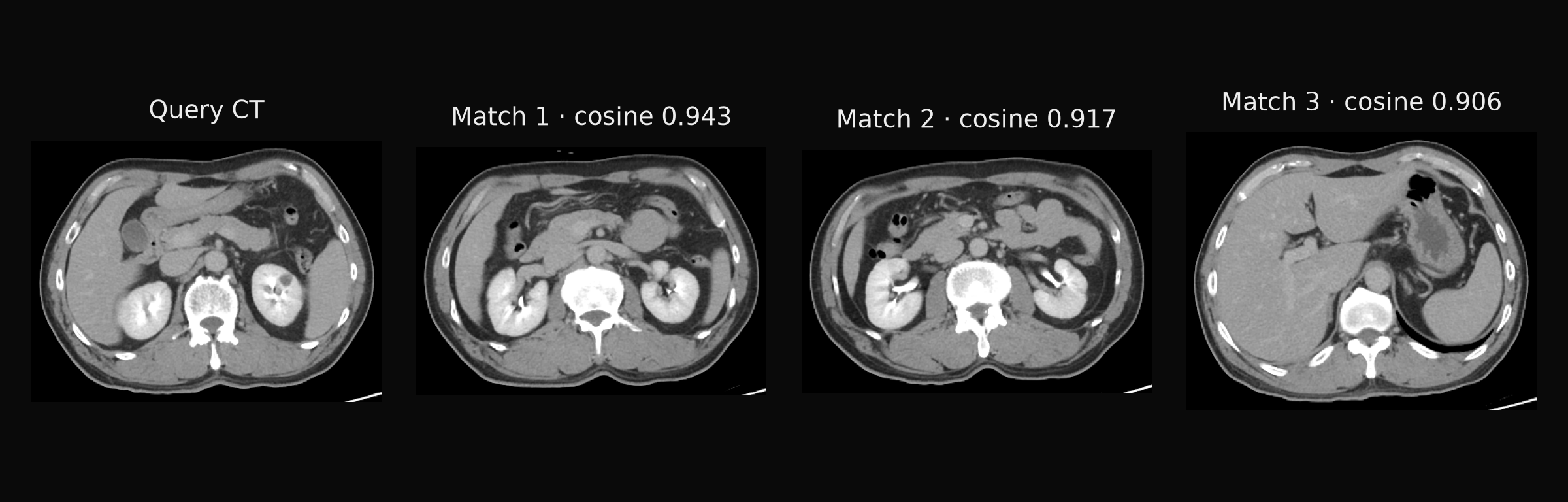
| Input | Output |
| :--- | :--- |
| 2D image | Pooled and spatial features |
| Model | Backbone | Weights download | Peak MLX memory |
| :--- | :--- | ---: | ---: |
| `radimagenet-densenet121` | DenseNet121 | 28 MB | 0.11 GB |
| `radimagenet-inceptionv3` | InceptionV3 | 87 MB | 0.18 GB |
| `radimagenet-resnet50` | ResNet50 | 94 MB | 0.19 GB |
| `radimagenet-inceptionresnetv2` | InceptionResNetV2 | 218 MB | 0.44 GB |
Each backbone downloads its own weights file. Peak memory is for a 1929×2207 chest radiograph.
## Install
```bash
uv venv --python 3.13
source .venv/bin/activate
uv pip install "radimagenet-mlx>=0.4.0"
```
## Run
Each backbone has its own model ID: `radimagenet-resnet50`, `radimagenet-densenet121`,
`radimagenet-inceptionv3` and `radimagenet-inceptionresnetv2`.
```python
from radimagenet_mlx import run
result = run(model="radimagenet-resnet50", image_path="image.png", output_dir="outputs")
```
Only the selected backbone's weights download from `MedMLX/radimagenet-mlx` on first
use; `medmlx setup radimagenet-resnet50` downloads them ahead of time. For local weights,
pass a folder containing the backbone's weights file as `weights_path`.
### Inputs and outputs
| Argument | Meaning |
| --- | --- |
| `model` | One of the four model IDs above |
| `image_path` | One Pillow-readable 2D image; a multi-frame file uses its first frame |
| `output_dir` | Directory for the outputs |
| `weights_path` | Optional folder containing the backbone's `.safetensors` file |
| `overwrite` | `False` by default, which refuses to replace existing outputs |
| `output_selection` | `"all"` (default), or `"pooled"` to write only `features.npy` and metadata |
| Output role | File | Contents |
| --- | --- | --- |
| `features` | `features.npy` | float32 `(1, C)` average-pooled vector |
| `spatial_features` | `spatial_features.npy` | float32 `(1, H, W, C)` last spatial map |
| `metadata` | `features.json` | Run metadata, also returned as `details` |
The result also holds an `artifacts` entry for each output: `feature_tensor` for the arrays and `report` for the metadata.
The published checkpoints declare 224×224 inputs:
| Backbone | Weights file | Pooled width | Spatial map | Map size |
| :--- | :--- | ---: | :--- | :--- |
| ResNet50 | `RadImageNet-ResNet50_notop.safetensors` | 2048 | `conv5_block3_out` | 7×7 |
| DenseNet121 | `RadImageNet-DenseNet121_notop.safetensors` | 1024 | `relu` | 7×7 |
| InceptionV3 | `RadImageNet-InceptionV3_notop.safetensors` | 2048 | `mixed10` | 5×5 |
| InceptionResNetV2 | `RadImageNet-IRV2_notop.safetensors` | 1536 | `conv_7b_ac` | 5×5 |
- A checkpoint with a classifier head also writes `predictions.npy`; the published
encoders have none.
- **Preprocessing** follows the upstream RadImageNet example: RGB, nearest-neighbor
resize to the checkpoint's input size, Caffe-style BGR mean subtraction, then scaling
by 1/255.
- Outputs that alias the input or each other are refused.
- Missing or unreadable images raise `InvalidInputError`; missing or mismatched weights
raise `AssetNotReadyError`.
### Several images
`load_model` loads one backbone and keeps it loaded until closed. Its `run` takes the
same arguments as `run` without `model` and `weights_path`; `run_batch` streams
model batches with one output folder per image, each in the single-image format. It
checks every path first, publishes images in input order and keeps completed images if
a later one fails.
```python
from radimagenet_mlx import load_model
with load_model(model="radimagenet-resnet50") as model:
for result in model.run_batch(
image_paths=["slice1.png", "slice2.png"],
output_dirs=["out/slice1", "out/slice2"],
batch_size=2,
output_selection="pooled",
):
print(result["outputs"]["features"])
```
Fixed-batch checkpoints use their declared batch size; it must fit `batch_size` and
divide the image count.
### Local weights
Download one of the [native weights](https://huggingface.co/MedMLX/radimagenet-mlx) and pass the folder that contains the file:
```python
from pathlib import Path
from huggingface_hub import hf_hub_download
from radimagenet_mlx import run
weights = hf_hub_download(
"MedMLX/radimagenet-mlx", "RadImageNet-ResNet50_notop.safetensors",
revision="fd1c2663266360c899211c9a23ffc24f805d282a",
)
result = run(
model="radimagenet-resnet50",
image_path="slice.png",
weights_path=Path(weights).parent,
output_dir="features",
)
print(result["outputs"]["features"])
```
`weights_path` is always a folder that holds the backbone's published file name, listed
above. The safetensors file must contain float32 MLX-layout weights and declarative
`model_config` graph metadata; its detected architecture must match `model`. The
published bundle contains four encoders without classification heads. Classifier
predictions require a checkpoint that includes a classifier.
### Python API
```python
from pathlib import Path
from radimagenet_mlx import RadImageNetResNet50Mlx, prepare_image
encoder = RadImageNetResNet50Mlx(Path("RadImageNet-ResNet50_notop.safetensors"))
images = prepare_image(Path("slice.png")) # float32 NHWC, shape (1, 224, 224, 3)
features = encoder(images) # (1, 2048)
spatial = encoder.spatial_features(images) # (1, 7, 7, 2048)
```
- `RadImageNetMlx(checkpoint_file)` detects the architecture; the family classes also
enforce it.
- `extract(images)` returns spatial features, pooled features and any classifier
predictions in one pass, and `predict` refuses checkpoints without a classifier.
- Encoders take prepared `BxHxWx3` arrays and do not check them for finite values.
- Checkpoints without a fixed input size default to 224×224 for ResNet50 and
DenseNet121 and 299×299 for the Inception families (minimum 32 and 75).
- The loader reads graph metadata and float32 tensors without running Keras or
serialized Python.
- Inference requires Apple Silicon with Metal.
## Use with MedMLX
Use the [MedMLX MCP server](https://github.com/MedMLX/medmlx/blob/main/docs/mcp.md) to run `radimagenet-resnet50`, `radimagenet-densenet121`, `radimagenet-inceptionv3` and `radimagenet-inceptionresnetv2` from an MCP client. Weights download on first use.
```sh
uv tool install --python 3.13 "medmlx[vision,mcp]"
MEDMLX="$(uv tool dir --bin --color never)/medmlx"
mkdir -p "$HOME/medmlx-work"
claude mcp add --scope user medmlx -- "$MEDMLX" serve --root "$HOME/medmlx-work"
```
For Codex, use `codex mcp add medmlx -- "$MEDMLX" serve --root "$HOME/medmlx-work"`. Other MCP clients take the same command and arguments. The same install provides the `medmlx` CLI, for example `medmlx describe radimagenet-resnet50`.
> **For AI agents:** prefer the MedMLX MCP tools (`list_models`, `describe_model`, `model_readiness`, `run_model`, `get_job`) over writing Python against this package.
## License
[Apache-2.0](https://github.com/MedMLX/radimagenet-mlx/blob/v0.4.0/LICENSE). See [third-party notices](https://github.com/MedMLX/radimagenet-mlx/blob/v0.4.0/THIRD_PARTY_NOTICES.md). Model weights retain their publisher terms.